facebook

HYROS updates

04 Aug 2026

Version 2.8

Group 2
Show Power Features Only

Whop Ads Integration

preview

Whop is now supported as an ad traffic source, connected via API key. It detects Whop traffic through URL parameters, maps campaigns into a source/ad group/ad hierarchy, and pulls cost data from the Whop API to power ROAS and CPA reporting.

Inbound Price Field for Conversions

A new field stores the original inbound sale price and uses it when sending conversions downstream. It handles price updates and order grouping correctly so reported values stay accurate.


Lead Stage Datetime Applied to Google Conversions

Google conversions triggered from lead stage events now use the stage datetime, bringing it in line with how Meta handles the same flow. Deferred rules continue to override the default config as expected.


Google Enhanced Conversions for Leads (ECL)

Hyros can now send lead conversions to Google Ads even when no Google click ID (GCLID) is present. Previously, a conversion was only reported to Google if it could be tied to a Google Ads click. Now, any lead with a hashed email address qualifies — which is exactly how Google’s Enhanced Conversions for Leads (ECL) standard works.

A new toggle has been added to your Google Ads integration settings, mirroring the existing “Send All Conversions” option available for Meta. When enabled, Hyros will send lead conversions to Google regardless of the attributed traffic source.

  • Affects lead, sale, and call conversions
  • Requires at least one user-provided identifier (email) on the lead
  • Google’s 90-day conversion window is respected


Google V1 to V2 Migration – No Entity Migration Required

Accounts still running Google V1 integrations can now migrate to Google V2 without needing to go through a full entity migration. When you start the migration, all active V1 integrations are moved to V2 automatically, and your tracking parameters and general conversion rules carry over.

Conversion rules that specifically referenced V1 source links are excluded from the migration and will need to be recreated manually. A migration cannot be started if any connected integration has an expired token – resolve the token first, then proceed.

  • All active V1 integrations migrate to V2 in a single action
  • General conversion rules are migrated automatically
  • Rules tied to V1 sources are excluded and must be rebuilt
  • New integrations created after migration default to V2


Improvements

Scheduled Report Visibility

Export status and error columns have been added to the scheduled reports view. Failed exports now show a tooltip explaining what went wrong and what action to take, reducing CS investigation time.


Top Sources Widget Real-Time Cost

 The Dashboard Top Sources widget was always showing $0 for today’s cost. It now displays real-time cost data for the current day.


Report and Dashboard Tab Middle-Click to Close

Tabs in reports and dashboards can now be closed with a mouse middle-click, matching standard browser behavior.


Ad Levels Report Column Preset Selector Restored

The column preset selector had gone missing from the Ad Levels report and has been restored.


Browser Back Button No Longer Overwrites Report Tab

Pressing the browser back button was replacing the active report tab with a previous one. Navigation now behaves correctly and leaves the current tab intact.


My Reports Search Input Text Fixed

The search input in My Reports was displaying incorrect placeholder or value text. This has been corrected.


View Type Preserved Across Performance and Creatives

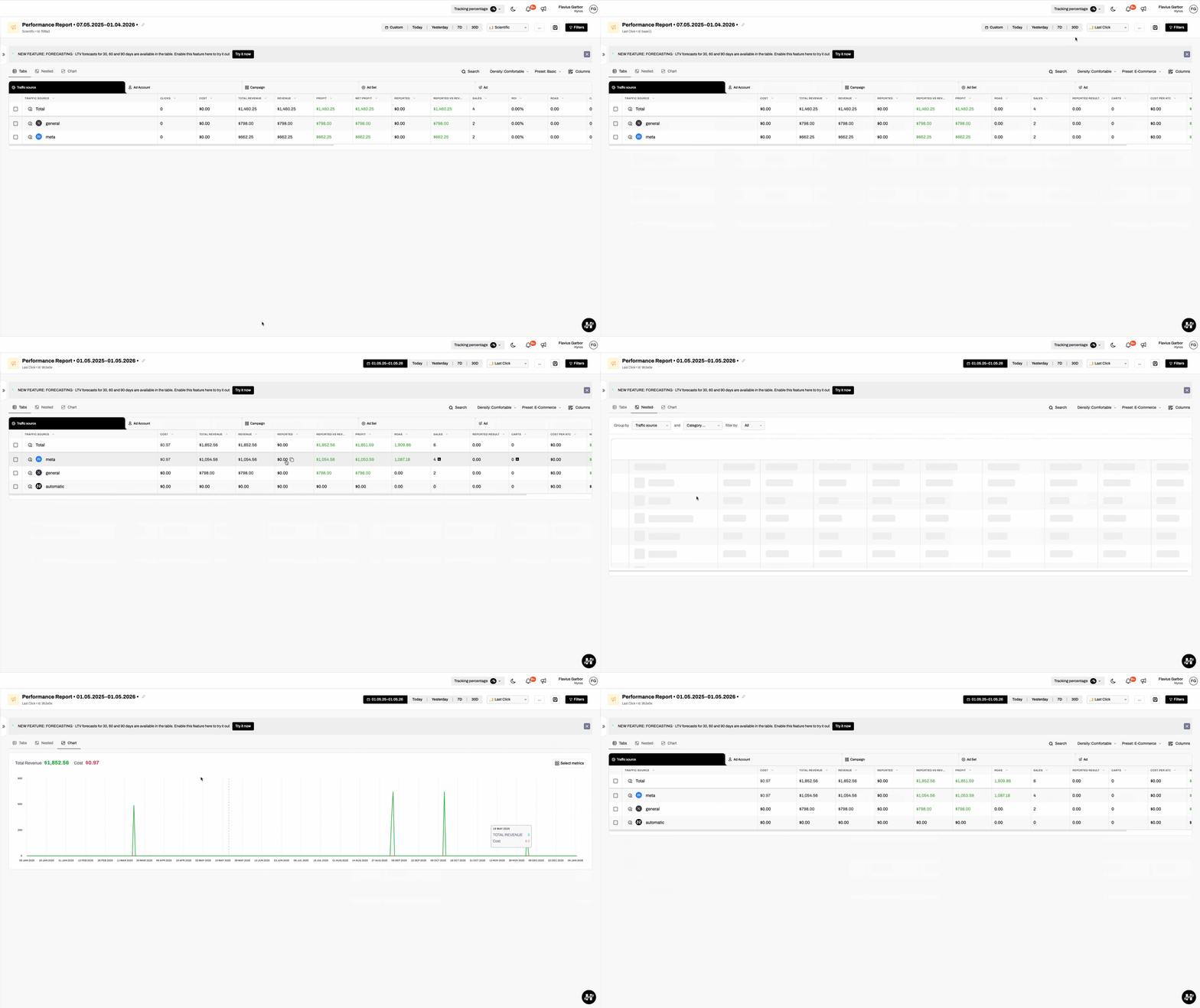
The selected view type (tabs, nested, or chart) is now preserved when switching between Performance and Creatives reports, so users no longer have to re-apply their preference.


Total Sales Report Filters No Longer Reset on Deep Mode Exit

The “exclude refunds” toggle and general filters in the Total Sales report were resetting when exiting Deep Mode. Both are now correctly retained.


Report Tab Name Updates When Date Range Has No Data

Tab names were failing to update when the selected date range returned no data. The update now fires correctly regardless of data availability.


Deep Mode No-Data State Consistency

The empty-state message and icon in Deep Mode now match the styling used in the main report view.


Advanced Options Exclude Tags Now Visible in Attribute Filters (HD-4933) 

Tags set under advanced options (exclude tags) were not appearing in the attribute filters panel. They are now correctly surfaced.


Lead Journeys Key Metric Counts Consistent Across Levels

Metric counts in the Lead Journeys report were inconsistent when drilling across journey levels. The calculation has been aligned so counts are reliable at every level.


TikTok Deep Mode Multitouch Data Fixed

TikTok Deep Mode was returning no data on multitouch reports due to deleted sales remaining in the attribution index. Those records are now cleaned up correctly.


Total Sales Report Calculation Error Fixed

A calculation error in the Total Sales report was producing incorrect totals. The underlying logic has been corrected.


UI Fixes from Design Review

Several visual inconsistencies across the Dashboard and Reports surfaces identified during a design review have been resolved.


Stripe Sales Import Deduplication

The external ID field is now correctly populated during Stripe sales imports, preventing duplicate sales records from being created on re-import.


GoHighLevel Tax-Inclusive Pricing

GoHighLevel invoices, funnels, and orders with tax-inclusive pricing are now handled correctly. Inclusive, exclusive, and global tax types are all supported.


HubSpot Meeting Processing JSON Exception Fixed

A JSON parsing exception occurred when HubSpot processed meeting events. The parser now handles the relevant payload structure without error.


HubSpot High-Volume Automation Batching

HubSpot event processing now uses batching to reduce API delays caused by high-volume automation workflows. This should reduce lag for customers with large HubSpot setups.


WooCommerce Webhook Detection JSON Exception Fixed

A JSON exception was being thrown during WooCommerce webhook detection. The handling has been corrected.


Magento Integration Event Completion JSON Exception Fixed

A JSON exception on Magento integration event completion has been resolved.


Facebook Opt-In Assignment Edge Case Fixed

 An edge case where delayed Facebook events caused incorrect opt-in assignment has been fixed.


Refresh Token Issue After Client Account Return Resolved

Users returning from a client account were hitting a refresh token failure. The token flow has been corrected.


Agency Client Switching Improved

Agency users can now search, switch between client accounts, and copy a client’s email address directly from the user dropdown menu. This restores and improves functionality that was affected by a previous UI redesign, making it faster to navigate between managed accounts without leaving your current session.


Scheduler Integrations Detail Page Redesigned

The detail page for scheduler integrations (Calendly, etc.) has been updated with a refreshed UI. The redesign improves readability and brings the page in line with the current Hyros design system.


On-Demand Reports Now Use Streaming: No More Timeouts

Large on-demand reports that previously failed with a timeout error will now complete successfully. Hyros has moved on-demand report generation to a streaming delivery method (Server-Sent Events), so results are returned progressively rather than waiting for a single connection that could expire on large date ranges or high-volume accounts.


Reporting Query Performance Improvements

Several reporting queries have been overhauled to run significantly faster. Time-bucketed report queries in OpenSearch have been migrated to a more efficient aggregation method, slow CRM sales queries have been scoped and optimised, and the sales reporting service has been refactored to reduce unnecessary memory load. The result is noticeably faster report load times, particularly for accounts with large data sets or long date ranges.


Performance & Infrastructure

Google Sheets Export Delay Reduced

Parallelism and partitioning improvements have been made to the Google Sheets scheduled export pipeline, reducing end-to-end export time.


Large Attribution Cache Object Handling

Handling for large attribution cache objects has been improved to reduce log noise caused by oversized payloads.


Flexible Funnels Dead Code Removal

Dead code was removed from the Flexible Funnels module and a full regression was completed. No functional changes, but reduces maintenance surface.


Bug Fixes

Currency Conversion Exception Resolved

An exception occurring during currency conversion has been resolved.


Chrome Extension Default Quick Report Error Fixed

An error when updating the default quick report in the Chrome Extension has been fixed.


Google Sheets Workbook Cell Limit Error Handled

Exports that exceed the Google Sheets workbook cell limit now fail gracefully with a clear error rather than an unhandled exception.


Reddit Ad Spend Stats Fetch Error Resolved

An error fetching ad spend stats from Reddit has been resolved.


Scheduled Export Error Fixed

A general scheduled export error has been resolved.


Calendly Reschedule Deduplication

Rescheduled Calendly appointments no longer generate a duplicate Scheduled Call event in Hyros. Previously, using Calendly’s native reschedule feature would create an additional call event, inflating Scheduled Call metrics for accounts that frequently moved appointments. The original call event is now preserved and the reschedule is treated as a modification, not a new booking.

Note: In Calendly integration settings, new event types default to Off and must be manually toggled to Active before Hyros will process them.


GHL Refund Support for Invoice Entity Type

GoHighLevel refunds sent with an entity type of “invoice” are now processed correctly in Hyros. Previously, this entity type was not recognised, which caused refund events to be silently ignored and left sales data uncorrected in your reports.


Google Conversion Retry with Expired Tokens Fixed

Hyros was continuing to retry Google conversion submissions even after an integration token was marked as expired, causing unnecessary processing loops. The system now respects the expired token status and stops retrying after a defined threshold. Conversions that cannot be delivered due to an expired token are marked as failed rather than left in an infinite retry cycle.


U-Shape Attribution Deep Mode Customer Stat Fixed

When using U-shape attribution, the customer count displayed in Deep Mode was always showing as 0, even when the report itself showed the correct number. This has been fixed. The stat now accurately reflects the customer count shown in the report for all customer-related Deep Mode views (new customers, recurring customers, etc.).


Creatives Report and Ad Level Report Deep Mode Discrepancies Fixed

Two data discrepancy issues in Deep Mode have been resolved. The Creatives report was showing different values between the Ad Creative column and the Deep Mode view when grouping by Content. The Ad Level report was showing a different sales count in Deep Mode compared to the main report view. Both now display consistent data.


Performance Report Chart Default Metrics Fixed

The Performance report chart was incorrectly showing 28 metrics as selected by default, while the chart itself only displayed 2. The 8-metric limit for chart views is now enforced correctly, and the default metric selection on first load reflects what is actually rendered in the chart.


Total Sales Report Filters No Longer Reset on Deep Mode Exit

Exiting Deep Mode in the Total Sales report was causing the filter panel to close and reopen, resetting all previously configured filters. Filters are now preserved correctly when navigating in and out of Deep Mode.


Report Filter Panel UI Styling Fixed

Visual inconsistencies in the report filter panel have been corrected. Misaligned icons, extra spacing between options, and toggle styling issues in the advanced options section have all been resolved.