


How Course Creators Track Webinar Ad Revenue
Here’s a problem I see constantly with course creators running webinar funnels: they’re optimizing for registrations while their attribution system is completely blind to which ads actually produce buyers. I’ve watched people spend $50,000 on ad campaigns and confidently scale the wrong ones because their dashboard only showed what happened inside a 7-day window.
Webinar ad attribution is the process of connecting revenue from course sales back to the specific ads that drove webinar registrations. A course creator runs ads on Meta, Google, or YouTube, sends traffic to a registration page, delivers a live or evergreen webinar, and then sells through a combination of live offers and email follow-up sequences. Attribution determines which of those original ad clicks actually produced paying customers — not just registrants, not just attendees, but buyers who completed a purchase days or weeks after the initial click. Without it, you are optimizing for registrations while remaining blind to which ads generate actual revenue.
TL;DR
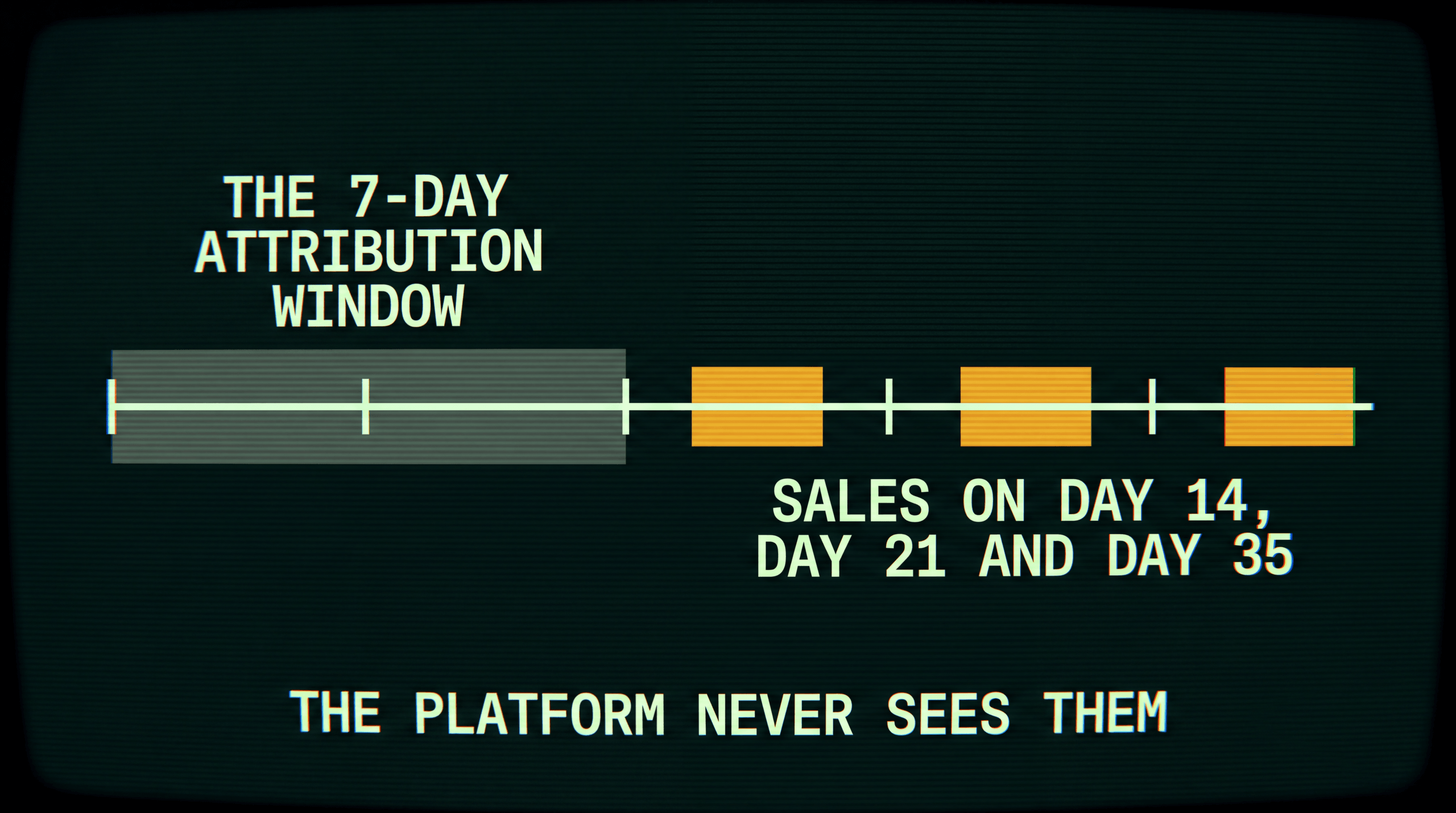
- Webinar funnels break platform attribution by design. The gap between ad click and purchase is typically 7-30 days, which exceeds Meta’s default 7-day click attribution window. Sales that close on day 8 or later are invisible to Meta Ads Manager.
- Evergreen replay sequences make it worse. Automated webinar funnels run 24/7, meaning a registrant might watch the replay two weeks after clicking an ad and buy three weeks after that. No browser cookie survives that timeline.
- Course creators need to track five events, not one: ad click, registration, attendance, offer click, and purchase. Platform pixels typically capture only the first two.
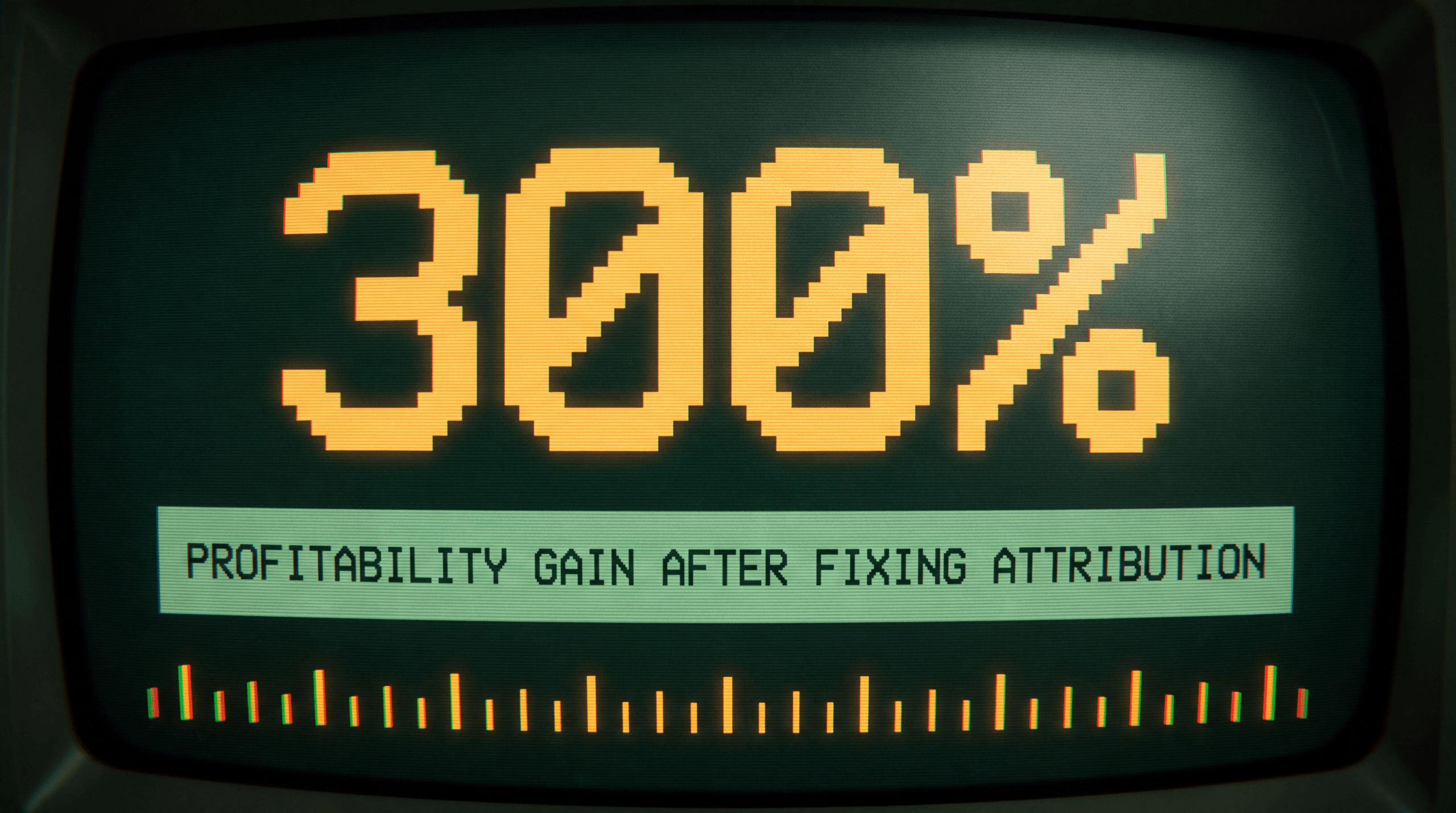
- According to a published Hyros case study, Dan Henry became 300% more profitable within 72 hours of implementing Hyros and scaled from $20K/month to $300K/month in ad spend — gains that required knowing which ads produced buyers, not just registrants.
- Hyros tracks webinar funnels end-to-end using server-side, deterministic matching that ties every purchase back to the original ad click regardless of how many days or devices sit between them.
Why Webinar Attribution Is Broken by Default
Webinar funnels are one of the most effective sales mechanisms in online education. They are also one of the hardest to attribute correctly. The problem is structural: every webinar funnel introduces time delays and platform switches that degrade tracking at each step.
The 4-step webinar funnel
A standard course creator webinar funnel follows this path:
- Ad click and registration. The prospect sees a Meta or YouTube ad, clicks through to a registration page, and enters their email. The ad platform’s pixel fires. Attribution is clean at this point.
- Webinar attendance. The registrant joins a live webinar or watches an evergreen replay hours or days later. They switch from their phone (where they saw the ad) to their laptop (where they watch the webinar). The original cookie is gone.
- Post-webinar follow-up. The prospect receives 3-7 follow-up emails over the next 5-14 days. Each email links back to a sales page or checkout. These clicks happen in an email client, not through an ad, so the ad platform has no visibility.
- Purchase. The prospect buys the course. This might happen on day 1 during the live pitch, or on day 12 after the third follow-up email, or on day 21 during a deadline sequence. The further from the ad click, the less likely any platform pixel will capture the conversion.
Each step introduces tracking loss. By the time the purchase happens, the original ad platform has often lost the connection between the buyer and the ad that started the journey.
Why 7-day attribution windows miss the sale
Meta’s default attribution window is 7-day click, 1-day view. Before iOS 14.5, it was 28-day click. That 75% reduction in the reporting window hit webinar funnels harder than almost any other business model.
Here is why. A typical webinar funnel timeline looks like this:
- Day 0: Ad click and registration
- Day 1-3: Reminder emails before webinar
- Day 3-4: Live webinar or first replay view
- Day 5-10: Post-webinar email sequence (value emails, testimonials, FAQ)
- Day 7-14: Cart-open or deadline sequence
- Day 10-21: Purchase
If the prospect buys on day 10, Meta’s 7-day window has already closed. That purchase never appears in your Meta Ads Manager. The ad that started the entire journey gets zero credit. You look at your dashboard and see a $50 cost-per-registration with no sales. The real picture — that the ad produced a $997 course sale on day 10 — is invisible.
This is not a minor gap. For a course creator running a 14-day follow-up sequence, more than half of total sales may fall outside the 7-day window. Those sales still happened. Those buyers still came from your ads. Your dashboard just cannot see them.
For a broader look at how attribution windows work across platforms, see our guide on what is ad attribution.
Evergreen replay sequences make it worse
Live webinars have a defined timeline. Someone registers, attends on the scheduled date, and enters a follow-up sequence. The gap between click and purchase is predictable — usually 7-21 days.
Evergreen webinars remove that predictability. An automated funnel might present a “watch now” replay that the registrant accesses days after signing up. Some evergreen systems use manufactured urgency (limited-time replay access, countdown timers) that resets for each viewer. The result is a highly variable timeline where one buyer purchases two days after clicking an ad and another purchases 35 days later.
Browser cookies on iOS Safari expire after 7 days under ITP restrictions. Cookies set via JavaScript can expire in as little as 24 hours on some configurations. An evergreen funnel that stretches past those windows is operating in a tracking dead zone for any system that depends on browser-based pixels.
This is why server-side tracking becomes essential for any course creator running webinar funnels at scale.
What a Webinar Funnel Should Track
Most course creators only track registrations and purchases. That gives you a conversion rate but tells you nothing about where the funnel leaks or which ads produce the highest-quality registrants. Here is the full measurement framework.
| Metric | What It Measures | Why It Matters |
|---|---|---|
| Cost per registration | Ad spend / registrations | Tells you acquisition efficiency at the top of the funnel |
| Registration-to-attendance rate | Attendees / registrants | Shows whether your reminder sequence is working (industry average: 30-45% for live) |
| Attendance-to-offer-click rate | Offer clicks / attendees | Measures webinar pitch effectiveness |
| Offer-click-to-purchase rate | Purchases / offer clicks | Measures checkout page conversion |
| Cost per acquisition (CPA) | Total ad spend / total purchases | The number that actually determines profitability |
| Revenue per registrant | Total revenue / total registrations | Lets you compare ad campaigns on a common denominator |
| Customer lifetime value by ad source | Total revenue per customer over 12+ months, segmented by originating ad | Reveals which ads bring buyers who also purchase upsells, coaching, and renewals |
The last two metrics — revenue per registrant and LTV by ad source — are where attribution accuracy matters most. A campaign with a $15 cost-per-registration might look expensive next to a campaign with $8 registrations. But if the $15 campaign attracts registrants who buy at 3x the rate and also purchase the $5,000 coaching upsell, it is far more profitable. You cannot see this without tracking the full journey from ad click through every downstream purchase. For more on why LTV segmentation changes budget decisions, see our guide on LTV calculation models.
The Attribution Window Problem — Worked Example
Here is a concrete scenario showing how Meta’s attribution window distorts webinar funnel data.
Setup: A course creator spends $10,000 on Meta Ads in January driving traffic to a webinar registration page. The course costs $997. The funnel uses a 14-day follow-up sequence after the webinar.
Actual results (tracked independently via server-side attribution):
| Time period | Sales | Revenue |
|---|---|---|
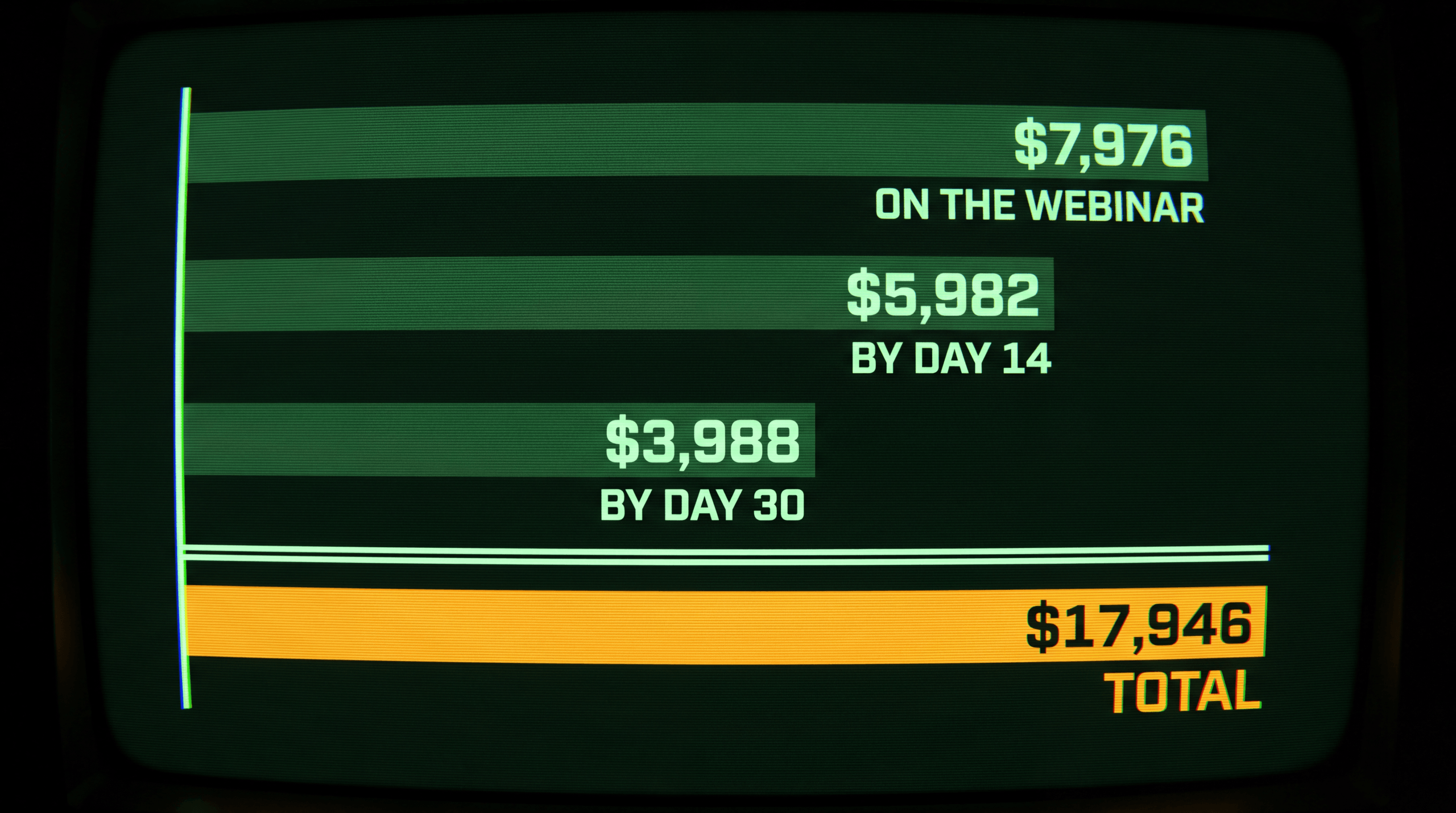
| Days 1-7 (within Meta’s window) | 8 | $7,976 |
| Days 8-14 (outside Meta’s window) | 6 | $5,982 |
| Days 15-30 (deep follow-up and deadline) | 4 | $3,988 |
| Total | 18 | $17,946 |
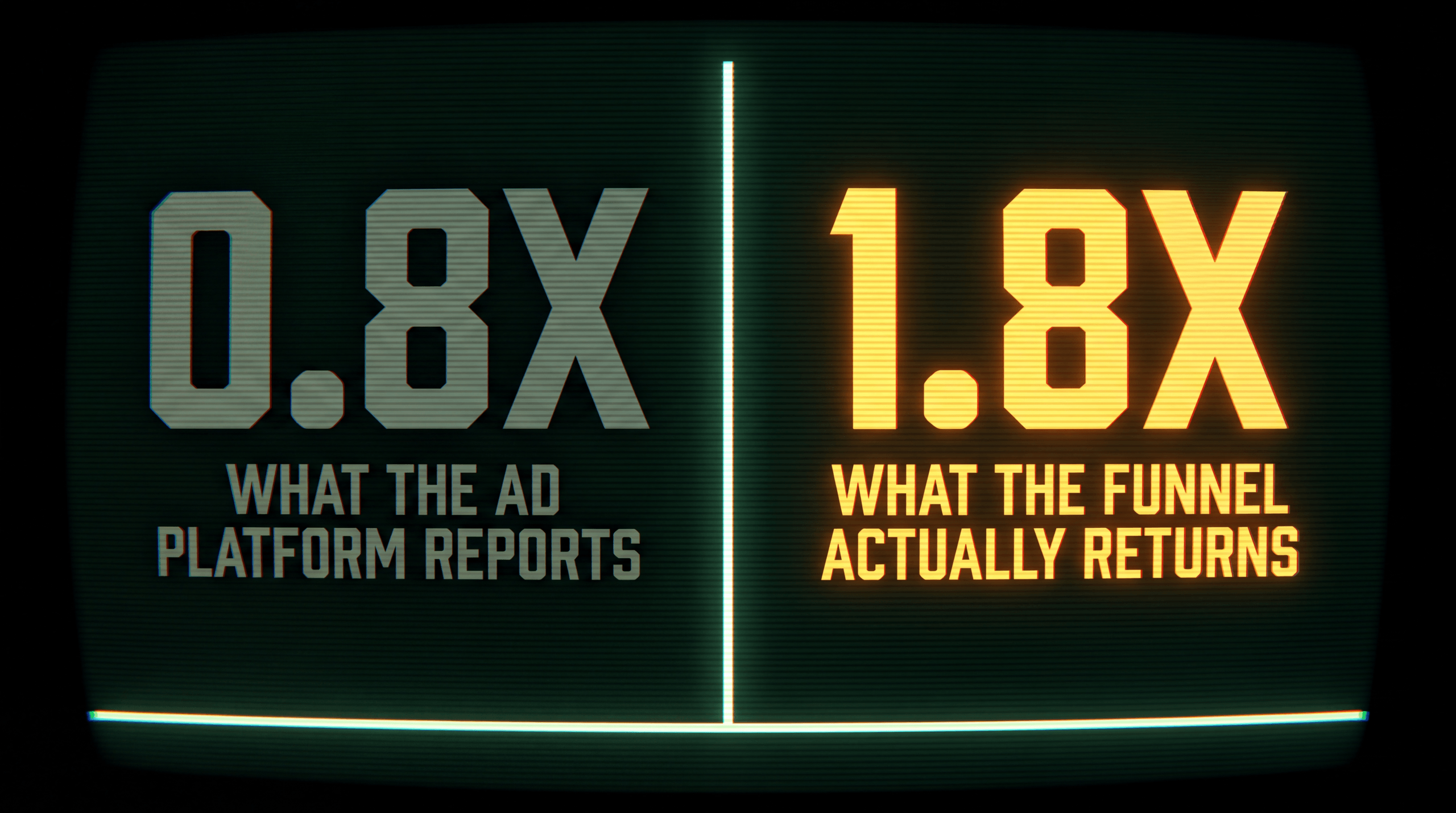
What Meta Ads Manager reports: 8 sales, $7,976 revenue. ROAS: 0.8x. The campaign appears unprofitable.
What actually happened: 18 sales, $17,946 revenue. ROAS: 1.8x. The campaign is solidly profitable.
The 10 sales that closed after day 7 represent 56% of total revenue. Meta never sees them. If you make budget decisions based on Meta’s reported ROAS, you kill a profitable campaign. If you have independent attribution that tracks the full journey, you scale it.
I’ve seen this exact scenario play out across dozens of course creator accounts. The campaign looks like a loser. They cut it. Then they wonder why their sales drop the next month. The problem was never the campaign. It was the window.
This is the core problem webinar attribution solves. The gap between reported and actual performance is not 5-10%. It can be 50% or more for funnels with extended follow-up sequences. An independent CheckThat.ai analysis aggregating Trustpilot reviews found user-reported tracking gaps of 29-33% between native platform reporting and server-side tracked data — and for webinar funnels with long follow-up sequences, that gap runs even wider.
How to Set Up Webinar Ad Tracking
Setting up accurate attribution for a webinar funnel requires tracking at five points in the customer journey, not just one. Here is the process.
Step 1: Tag every ad URL with UTM parameters and click IDs
Every ad pointing to your webinar registration page needs consistent UTM tagging. Use utm_source, utm_medium, utm_campaign, and utm_content at minimum. Ensure your registration page captures and stores the fbclid (Meta), gclid (Google), or ttclid (TikTok) click ID parameters. These are the identifiers that tie a future purchase back to the original ad click.
Store these values in your database alongside the registrant’s email address. Do not rely on browser cookies alone — they expire.
Step 2: Track registration as a server-side event
When someone submits their email on the registration page, fire a server-side event (Meta CAPI, Google Enhanced Conversions) in addition to any browser pixel. This records the registration even if the user has an ad blocker or if Safari’s ITP has limited cookie functionality. Pair the server event with the click ID captured in Step 1.
Step 3: Track webinar attendance
Your webinar platform (WebinarJam, EverWebinar, Demio, EasyWebinar, or a custom setup) should log attendance. Connect this data to the same user profile. The registrant’s email is the linking identifier. Log whether they attended live, watched a replay, and how long they stayed. These engagement metrics predict purchase likelihood and help you evaluate webinar content quality independently from ad quality.
Step 4: Track post-webinar email engagement
Your email platform (ActiveCampaign, ConvertKit, Drip, Keap) tracks opens and clicks. The key tracking point is clicks on links to your sales page or checkout page within follow-up emails. Each click should carry the original attribution data (or at minimum, a user identifier that ties back to the ad source stored in your database).
Step 5: Track the purchase and attribute it to the original ad
When the customer buys, connect the transaction to the original ad click. This requires matching the buyer’s email (or another persistent identifier like phone number) back through the chain: purchase email matches registration email, registration record contains the original click ID and UTM data. Fire a server-side purchase event to the ad platform with the original click ID so the platform can update its optimization algorithm.
This five-step process works whether you build the tracking yourself or use a platform. The critical requirement is a persistent identifier (email) that survives across all five steps. Browser cookies will not survive steps 3 through 5 for most webinar funnels.
For the technical details on implementing server-side events, see our complete guide on server-side tracking.
Live Webinar vs Evergreen Webinar Attribution Differences
Live and evergreen webinar funnels share the same structure but differ in timing, and those timing differences create distinct attribution challenges.
| Factor | Live Webinar | Evergreen Webinar |
|---|---|---|
| Registration-to-webinar gap | Fixed (1-7 days, usually) | Variable (minutes to weeks) |
| Follow-up sequence start | Same date for all registrants | Different for each registrant |
| Purchase window | 7-21 days from ad click | 7-60+ days from ad click |
| Cookie survival probability | Moderate (many sales within 7 days) | Low (most cookies expire before purchase) |
| Meta attribution capture rate | Partial (captures day 1-7 sales) | Minimal (most sales outside 7-day window) |
| Replay traffic source | Direct or email click | Automated email or on-page trigger |
| Device switching | Common (phone ad, laptop webinar) | Very common (multiple sessions across devices) |
| Attribution solution required | Server-side recommended | Server-side required |
The practical difference: a live webinar funnel might lose 30-50% of its sales to attribution gaps. An evergreen funnel can lose 60-80%. The evergreen model compounds every timing problem because there is no fixed schedule anchoring the customer journey.
For course creators running both live and evergreen funnels simultaneously — which is common (live launch followed by evergreen replay) — the attribution challenge doubles. Some buyers attended the live event. Others found the evergreen replay weeks later. Both groups may have clicked the same ad campaign. Without individual-level tracking that follows each person through their unique path, your campaign data mixes both groups into a single, misleading average.
Case Study — Dan Henry’s 300% Profitability Gain
Dan Henry runs a digital course and coaching business selling programs on how to build and scale online businesses. His ad funnels rely heavily on webinars and automated follow-up sequences — exactly the kind of multi-step journey that breaks platform attribution.
According to a published Hyros case study, Dan Henry became 300% more profitable within 72 hours of implementing Hyros. He also scaled from $20K/month to $300K/month in ad spend — a 15x increase in media budget.
That kind of scaling is impossible without granular attribution data. At $20K/month, you can tolerate some guesswork. At $300K/month, every misattributed dollar compounds. Scaling 15x on bad data would mean burning $280K/month in untracked spend. The fact that profitability increased while spend scaled means the attribution data was accurate enough to identify which ads produced buyers (not just registrants) and allocate budget accordingly.
The 72-hour profitability improvement also reveals something specific: it suggests the tracking immediately surfaced campaigns that were profitable but appeared unprofitable under platform reporting, and campaigns that appeared profitable but were actually burning money. Knowing which is which lets you reallocate budget the same day you see the data.
This is not unique to Dan Henry’s business. According to a published Hyros case study, Regenalight’s CEO discovered that $80K-$100K/month in ad spend was going to campaigns that produced zero return. After fixing the allocation using independent attribution data, the company grew from $1M to $3M/month in revenue in a single quarter.
Both cases follow the same pattern: the tracking did not create new customers. It revealed where existing customers were actually coming from, which allowed budget to move from wasteful campaigns to productive ones. My experience building Hyros for my own ad accounts showed me the same thing: the data is rarely wrong. Your window is.
How Hyros Tracks Webinar Funnels End-to-End
Hyros was built for exactly this kind of multi-step, multi-day funnel. I built it because I was running webinar-style campaigns on my own accounts and kept getting numbers that did not add up. Here is how it handles the five attribution challenges that webinar funnels create.
Challenge 1: The time gap. Hyros does not depend on platform attribution windows. It uses its own server-side tracking to connect a purchase to the original ad click regardless of whether that click happened 3 days ago or 90 days ago. There is no 7-day or 28-day cutoff.
Challenge 2: Device switching. When a prospect clicks an ad on their phone and watches the webinar on their laptop, Hyros matches both sessions to the same person using deterministic identifiers — primarily email address and phone number. No probabilistic guessing. No cookie dependency.
Challenge 3: Email sequence attribution. Hyros tracks the email follow-up journey as part of the customer timeline. When a buyer clicks an email link and purchases, Hyros attributes that sale back to the original ad that generated the registration, not to “email” as a source. This prevents the common error of crediting your email list for sales that your ads actually generated.
Challenge 4: Evergreen funnel variability. Because Hyros tracks each user individually with persistent identifiers, the timing of the funnel does not matter. Whether someone watches the replay on day 1 or day 30, the system maintains the connection between their ad click and their eventual purchase.
Challenge 5: Multi-product attribution. Course creators typically sell a front-end course and then upsell coaching, mastermind access, or additional programs. Hyros tracks all downstream purchases and attributes them to the original ad using a multi-touch attribution approach that credits the full customer journey, not just the last click. This gives you true LTV by ad source, which is the metric that determines whether you should scale a campaign — not first-purchase ROAS.
Across more than 4,000 customers and $3.5 billion in tracked revenue, Hyros has consistently identified 29-33% more conversions than native platform reporting, according to an independent CheckThat.ai analysis. For webinar funnels, where the time gap between click and purchase is longer than average, that recovery rate is often higher.
Hyros starts at $230/month on an annual plan ($379/month on monthly billing) and includes a 90-day money-back guarantee. Trustpilot users rate it 4.8/5 across 600+ reviews.
For a deeper look at how info-product businesses specifically benefit from independent tracking, see our guide on info-product ad tracking. For a comparison of Hyros against other attribution platforms used by course creators, see Hyros vs Triple Whale.
See how Hyros tracks every webinar sale back to the ad that started it — Book a demo
FAQ
How long after a webinar do most course sales happen?
Most webinar-driven course sales follow a bimodal pattern. The first cluster happens during or immediately after the live pitch — typically within the first 24-48 hours. The second, often larger cluster happens during the follow-up email sequence, which runs 5-14 days after the webinar. For courses priced above $500, it is common for 50-60% of total sales to come from the follow-up sequence, not the live event. Evergreen funnels extend this window further, with purchases sometimes occurring 30-60 days after the initial ad click. This extended timeline is why standard 7-day attribution windows miss a significant portion of webinar revenue.
Can I track webinar attendance inside my ad platform?
Ad platforms can track registration (a form submission on your page) but not attendance. Webinar attendance happens on a third-party platform (Zoom, WebinarJam, Demio) or a self-hosted page. The ad platform’s pixel has no visibility into whether someone actually showed up. You need to pull attendance data from your webinar tool and match it to registrants in your attribution system. This is a server-side data integration, not something a Meta Pixel or Google tag can handle.
What is the difference between tracking registrations and tracking revenue?
Tracking registrations tells you which ads produce opt-ins. Tracking revenue tells you which ads produce buyers. These are often different campaigns. A broad-audience Meta campaign might generate cheap $5 registrations from people who never attend or buy. A narrower YouTube campaign might produce $25 registrations from people who attend at 60% and buy at 8%. The YouTube campaign looks 5x more expensive on a cost-per-registration basis but produces higher revenue per dollar spent. You cannot make this distinction without end-to-end revenue tracking tied to the original ad source.
Do I need attribution software if I only run one ad platform?
Even on a single platform, attribution software adds value for webinar funnels because of the time gap problem. Meta’s 7-day window will still miss sales that close after day 7. You will still lose tracking when people switch devices between ad click and purchase. And you will still lack visibility into which specific ads and creatives produce buyers versus registrants. Single-platform advertisers benefit less from cross-platform deduplication, but the time-gap and device-switching problems are platform-independent.
How does webinar attribution differ from e-commerce attribution?
E-commerce attribution typically involves a shorter path: ad click, product page, checkout, purchase — often completed in a single session or within a few days. Webinar attribution involves a longer path with more steps (registration, attendance, follow-up sequence, purchase) spread across more days and usually more devices. The extended timeline and multiple touchpoints mean that webinar funnels experience higher tracking loss from cookie expiration, device switching, and attribution window cutoffs. E-commerce businesses can often get reasonable data from platform pixels alone. Webinar-based businesses almost always need independent, server-side attribution to get accurate numbers.
What metrics should I optimize first in a webinar funnel?
Start with revenue per registrant segmented by ad campaign. This single metric captures the entire funnel — registration rate, attendance rate, pitch conversion rate, and average order value — in one number. If Campaign A produces registrants worth $12 each and Campaign B produces registrants worth $38 each, you know where to allocate budget without needing to diagnose every funnel step. Once you identify your best campaigns, then drill into attendance rate and offer-click rate to find optimization opportunities within the funnel itself. For long-term scaling, add LTV by ad source to account for upsells and repeat purchases.
Standalone Summary
Webinar ad attribution connects course revenue to the specific ads that drove webinar registrations. Standard platform tracking fails for webinar funnels because the gap between ad click and purchase typically spans 7-30 days, exceeding Meta’s default 7-day attribution window. Evergreen replay funnels stretch this gap further, with purchases occurring 30-60 days after the original click. Course creators need to track five events — ad click, registration, attendance, email engagement, and purchase — and connect them through a persistent identifier like email, not browser cookies that expire. Server-side attribution platforms solve this by maintaining individual-level tracking across devices and time gaps. According to a published Hyros case study, Dan Henry became 300% more profitable within 72 hours of implementing Hyros and scaled from $20K/month to $300K/month in ad spend. Accurate webinar attribution reveals which ads produce buyers, not just registrants, enabling profitable scaling of ad budgets.