
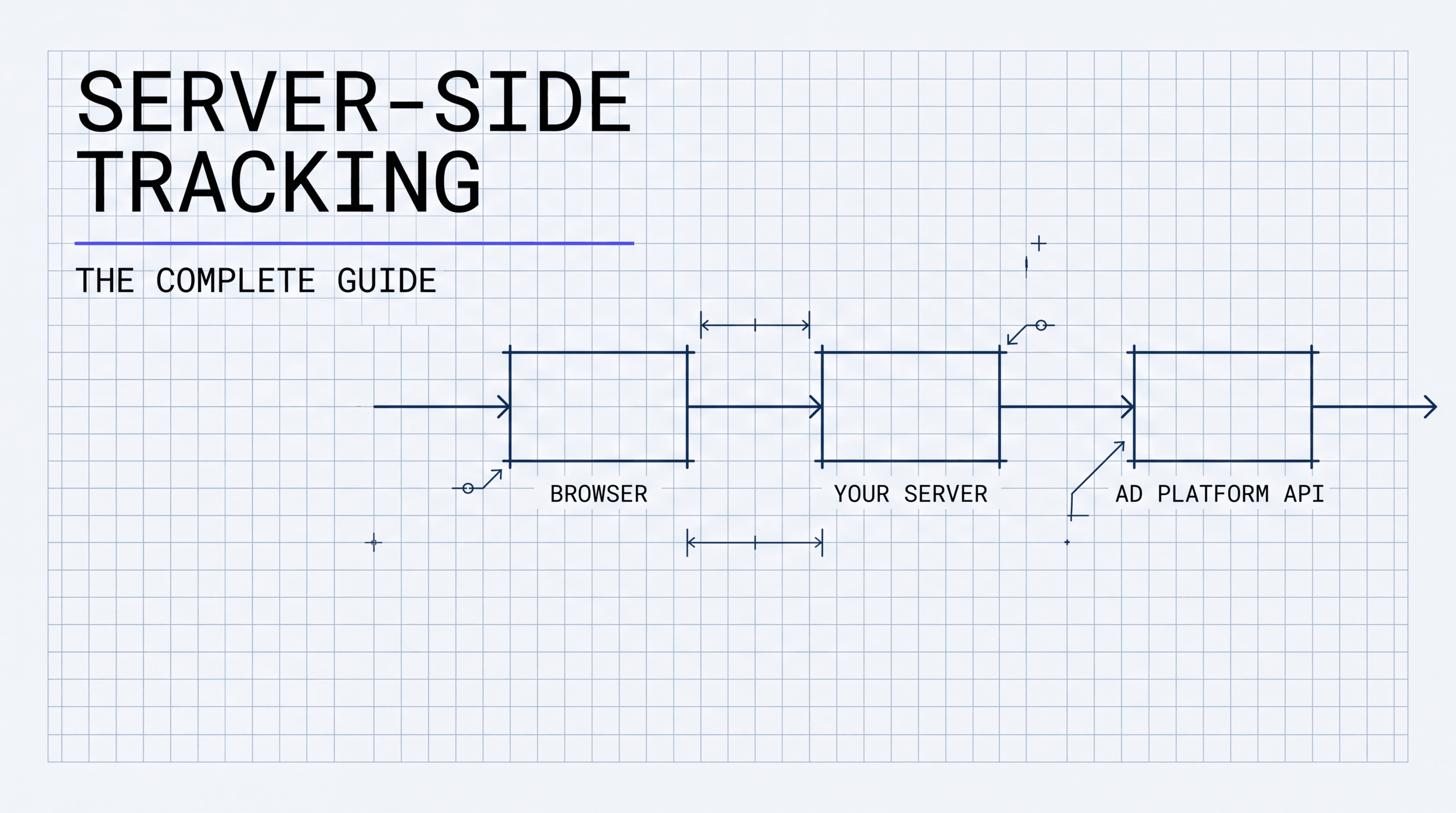

Server-Side Tracking: The Complete Guide
Server-side tracking isn’t a “nice-to-have technical upgrade.” It’s the difference between guessing and knowing. If your tracking lives in the browser, you’re flying blind on a significant chunk of your traffic post-iOS 14, and every budget decision you make on top of that incomplete data is compounding the damage. I built the attribution infrastructure at Hyros specifically because I kept watching advertisers lose money they didn’t even know they were losing.
TL;DR
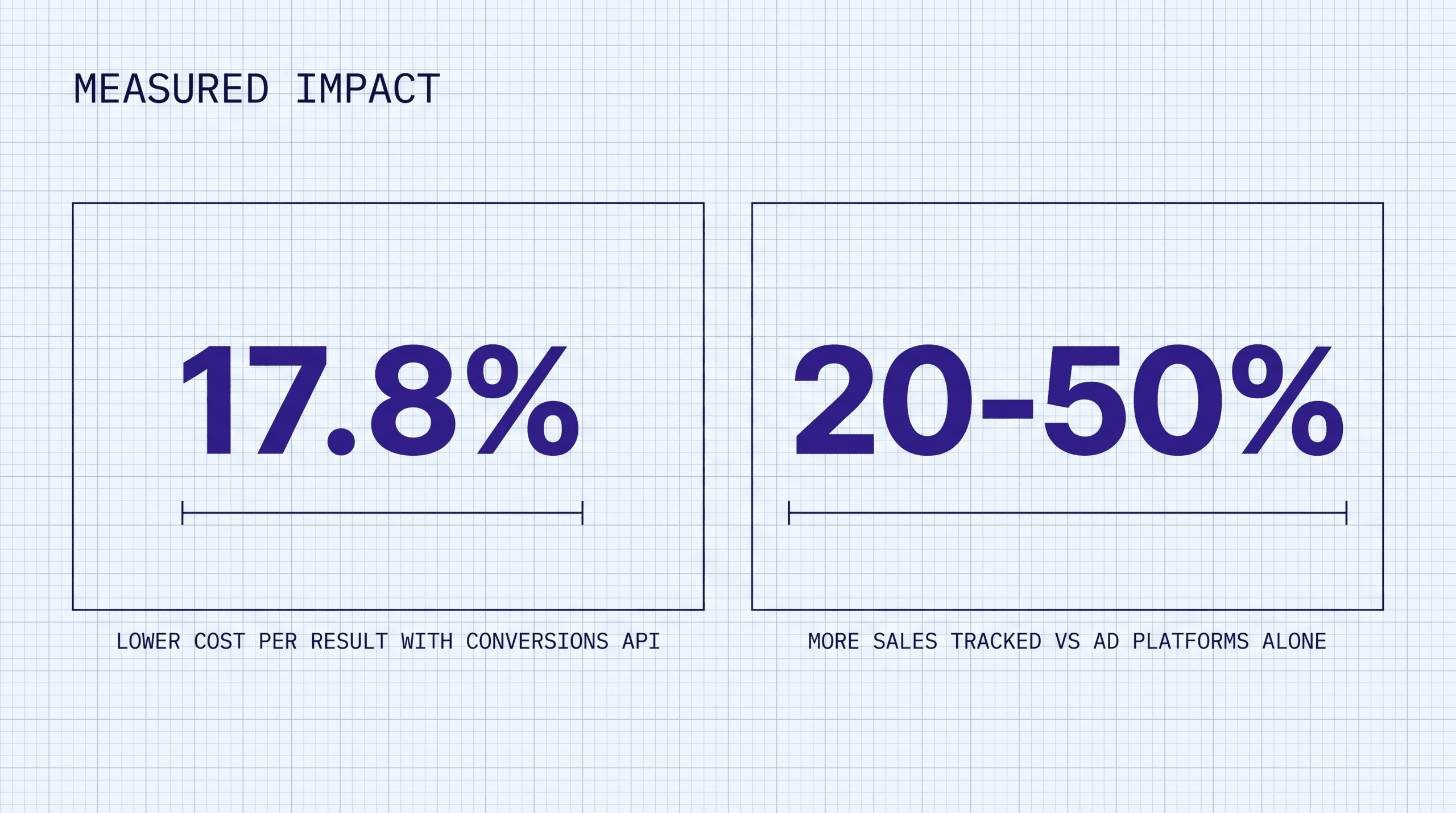
- Server-side tracking fires events from your server, not the visitor’s browser. This means ad blockers, Safari ITP, and cookie restrictions don’t prevent your conversion data from reaching Meta, Google, or TikTok. Per Meta’s April 2026 announcement, advertisers with a Conversions API setup for web events saw an average 17.8% lower cost per result compared to those without CAPI (Meta for Business, April 15 2026).
- Client-side pixels now lose 15-40% of conversions on iOS Safari due to ITP 2.3 and later versions that cap cookie lifetimes to 7 days (or 24 hours for some). After iOS 14.5, roughly 96% of US iPhone users initially opted out of app tracking (Flurry Analytics, 2021), though opt-in rates have since climbed to approximately 35-37% as of 2026. Server-side tracking recovers most of that lost signal.
- You can build your own server-side pipeline or use a platform like Hyros. Building requires maintaining a server-side Google Tag Manager container or custom API integrations. Hyros ships a server-side tracking layer out of the box and reports tracking 20-50% more sales than ad platforms alone, without you writing or hosting any code.
What Is Server-Side Tracking?
Server-side tracking is a method of sending user event data (page views, add-to-carts, purchases) from your web server to advertising and analytics platforms through server-to-server API calls. Instead of loading a JavaScript tag in the visitor’s browser that fires a pixel to Meta or Google, your server collects the event data and sends it directly via HTTP POST request.
The concept isn’t new. Backend event logging has existed since the early days of web development. What changed is that the browser became an unreliable data pipeline. Apple’s Intelligent Tracking Prevention (ITP), ad blockers used by over 30% of desktop users, and the phaseout of third-party cookies in Chrome made browser-based pixels miss a significant chunk of conversions.
When Meta launched Conversions API (CAPI) in 2020, it marked the first time a major ad platform officially supported (and eventually recommended) server-side event transmission as a primary tracking method. Google followed with server-side Google Tag Manager (sGTM), which went into public beta in August 2020 and reached general availability in 2021. TikTok launched its Events API shortly after.
The shift wasn’t optional. After Apple’s iOS 14.5 App Tracking Transparency update in April 2021, platforms lost massive amounts of conversion data overnight. Meta projected a $10 billion revenue impact from the changes. I’ve set up server-side tracking for clients who came to us after iOS 14.5 gutted their pixel data. Reported conversions dropped 30-40% overnight with no change in actual sales. Server-side tracking became the recommended way to recover that signal. In fact, the original reason I built the tracking layer inside Hyros was watching accounts like these. Good businesses with real customers, but attribution so broken they were scaling the wrong campaigns.
For a broader look at how tracking fits into the measurement stack, see our guide on ad tracking vs analytics.
Client-Side vs Server-Side Tracking
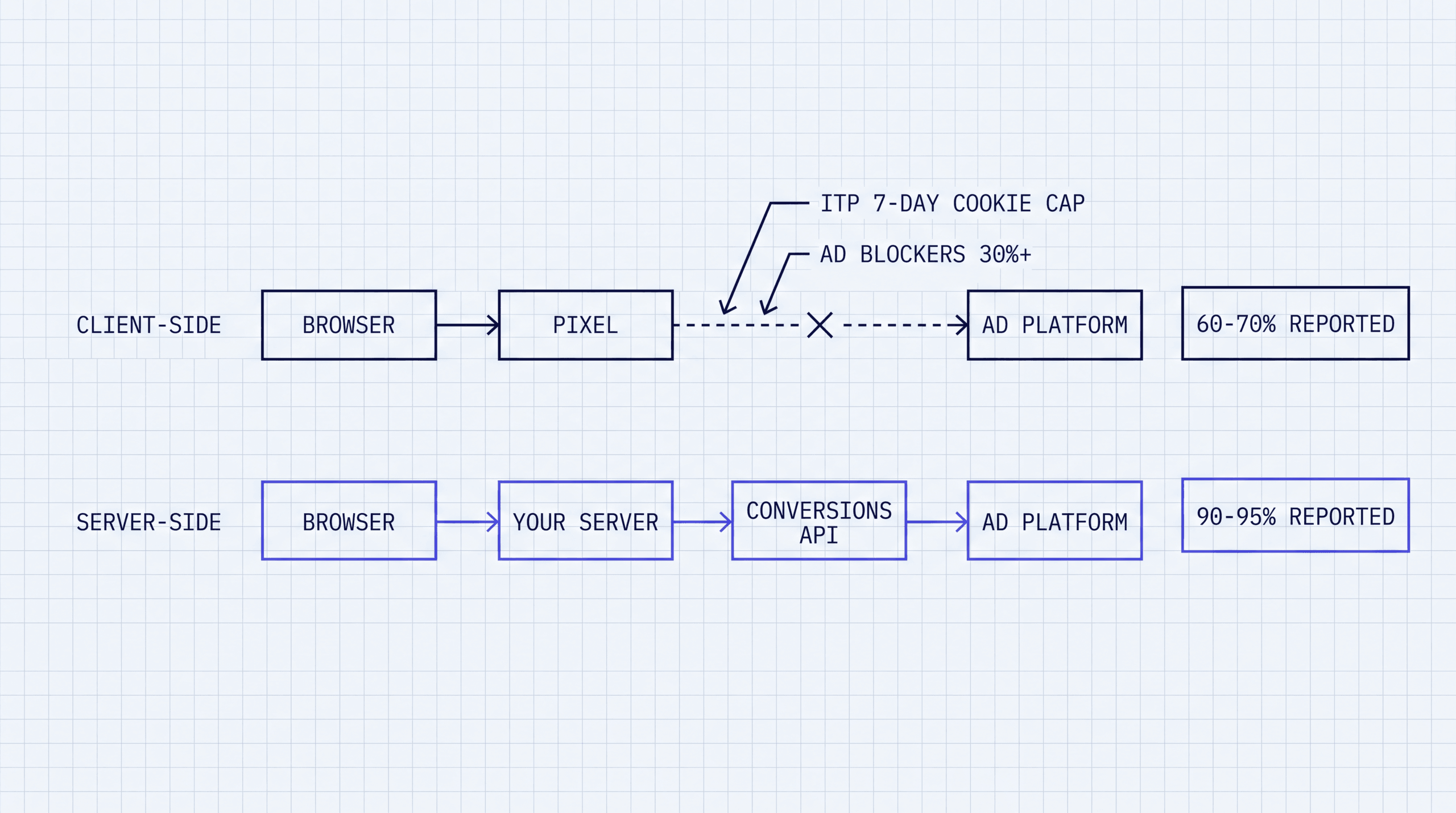
The difference between client-side and server-side tracking comes down to where the tracking code runs and who controls the data transmission.
| Factor | Client-Side (Pixel) | Server-Side (API) |
|---|---|---|
| Where it runs | Visitor’s browser | Your server |
| Blocked by ad blockers | Yes | No |
| Affected by ITP/cookie limits | Yes (7-day or 24-hour caps) | No (uses first-party server calls) |
| Data control | Platform receives raw browser data | You control what data is sent |
| Setup complexity | Copy-paste a script tag | Requires server config or platform |
| Page load impact | Adds JS weight, slows page | Zero browser overhead |
| Conversion accuracy | Loses 15-40% on iOS Safari | Recovers most lost conversions |
| Privacy compliance | Limited (cookie consent gates data) | Easier (you filter PII server-side before sending) |
Client-side tracking isn’t dead. Meta still recommends running the Pixel alongside CAPI for event deduplication. Google Ads Enhanced Conversions works best when the gtag fires in the browser and the server sends a matching event. But the browser-only approach is no longer sufficient as a standalone strategy.
Let’s imagine two advertisers running identical campaigns to the same audience. Advertiser A runs a pixel-based pipeline. The browser fires a conversion tag when the customer checks out. On iOS Safari, that tag is blocked by ITP before it lands. The ad blocker on the customer’s Chrome browser strips it entirely. The fbclid in the URL gets stripped by the landing page’s CMS. Net result: maybe 60-70% of actual conversions get reported. Advertiser B runs server-side. When the order hits the backend, an HTTP POST goes straight from the server to Meta CAPI. No browser in the loop. No ITP. No ad blockers. No stripped parameters. Typical data preservation jumps from 60-70% up to 90-95%+. Meta’s algorithm for Advertiser B is learning from nearly complete data. Advertiser A’s algorithm is optimizing against a dataset with a 30-40% blind spot.
The practical difference shows up in your ad account. If your Meta Pixel fires on 70% of actual conversions (because 30% are blocked or expire), Meta’s algorithm optimizes against an incomplete dataset. It thinks certain audiences and creatives are underperforming when they’re actually converting. Your tracking just missed it. According to data from the Hyros Shopify integration page, Facebook underreports conversions by approximately 30%, Google by 29%, and TikTok by 33% compared to server-side tracked data.
Why Server-Side Tracking Matters in 2026
Here’s the thing most people running ads don’t want to hear: you’re probably not in control of your attribution. You think you are. You’re looking at Meta’s dashboard, Google’s dashboard, maybe GA4. And you think those numbers mean something. They don’t. Not fully.
Facebook’s going to take credit for the sale. Google’s going to take credit for the sale. And you’re not even going to see where credit is actually going, because what happens is if Google and Facebook are both saying they got this sale, and you can’t verify it because it’s a black box, you’re optimizing against fiction. Server-side tracking is the only way to break open that black box. It sits outside the platforms and captures the data before they can claim it. That’s the actual promise. Not more attributed conversions, not better ROAS numbers in your dashboard. Real data, independent of what any platform wants you to believe.
Three forces made server-side tracking a requirement, not a nice-to-have.
iOS Safari ITP and App Tracking Transparency
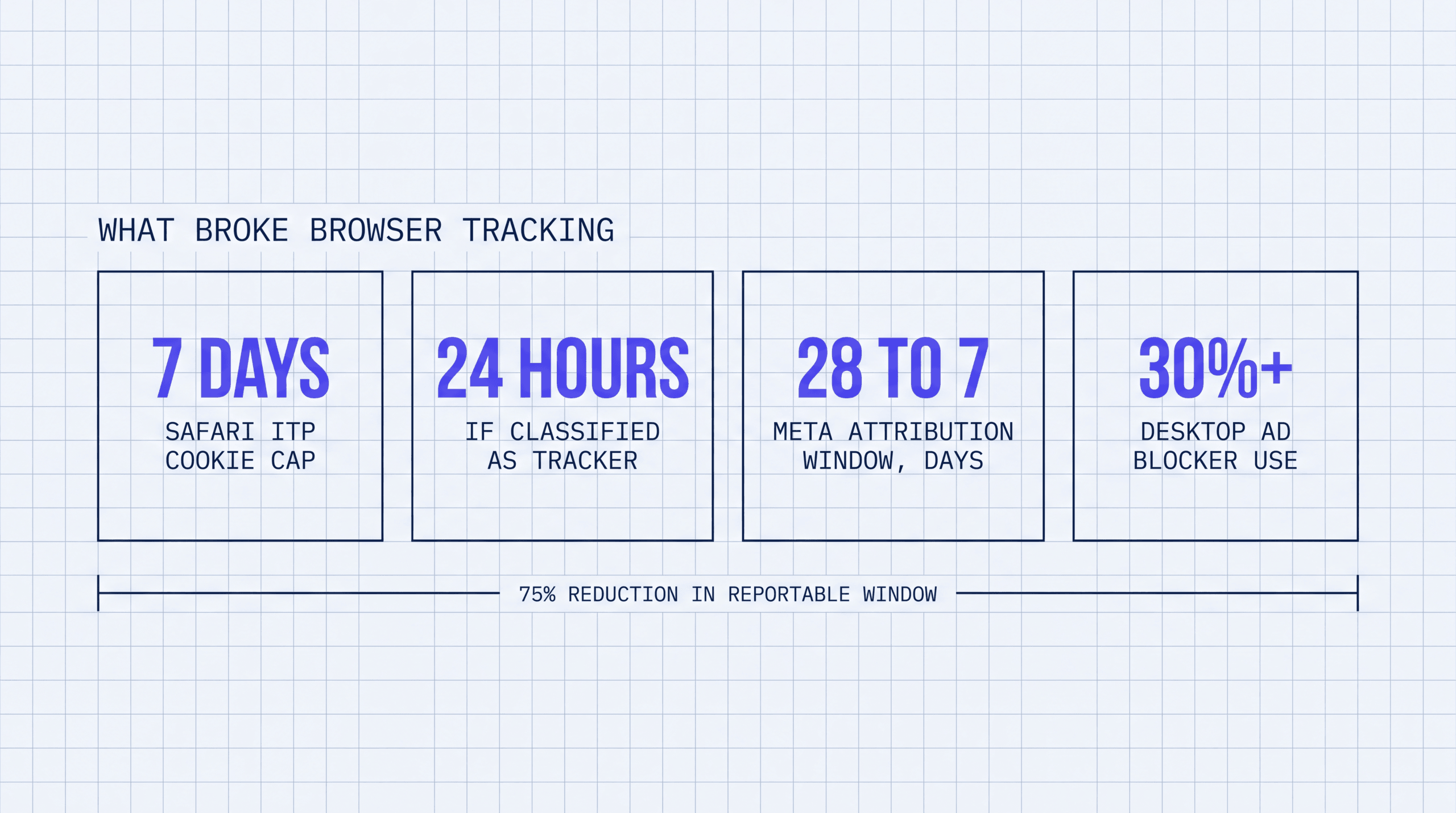
Apple’s Intelligent Tracking Prevention has been restricting cookies in Safari since 2017, but ITP 2.3 and later versions dealt the biggest blow. First-party cookies set via JavaScript (which is how most tracking pixels work) are now capped to 7 days. In some cases, when the referring domain is classified as a tracker, the cap drops to 24 hours.
This means a visitor who clicks your Meta ad on an iPhone, browses your site, and comes back 8 days later to buy won’t be attributed to that original click by the Meta Pixel. The cookie expired. The conversion is invisible.
On top of ITP, Apple’s App Tracking Transparency (ATT) framework launched in April 2021. It gave users an explicit opt-in prompt for cross-app tracking. In the months following iOS 14.5’s launch, roughly 96% of US iPhone users declined tracking (Flurry Analytics, 2021), though opt-in rates have since climbed to approximately 35-37% as of 2026. Meta’s attribution window collapsed from 28 days to 7 days, a 75% reduction in the conversion data it can report.
Server-side tracking bypasses ITP because the event is sent from your server, not from Safari. The browser’s cookie policies don’t apply to server-to-server HTTP requests. The conversion still gets reported to Meta even if the user’s browser cookie expired a week ago. For a deeper look at how iOS privacy changes affected attribution, see our guide on iOS 14 attribution.
Ad Blocker Adoption
Ad blocker usage has passed 30% of desktop users globally. Users running uBlock Origin, AdGuard, or similar tools block JavaScript tracking pixels from loading entirely. Their purchases never register in your Meta Ads Manager, Google Ads, or GA4 dashboards. They are invisible customers.
Server-side tracking is unaffected because the blocking happens in the browser. Your server collects the conversion event from your own application logic (order completed, payment processed) and sends it via API. The user’s browser extensions have no visibility into your server’s outbound API calls.
First-Party Data for Meta, Google, and TikTok
All three major ad platforms now prioritize first-party data signals. Meta’s Conversions API, Google’s Enhanced Conversions, and TikTok’s Events API are all server-side endpoints designed to receive hashed customer data (email, phone, IP address) alongside conversion events.
These platforms use that first-party data to improve ad delivery. Per Meta’s April 15 2026 announcement, advertisers with a Conversions API setup for web events saw an average 17.8% lower cost per result compared to advertisers without CAPI (Meta for Business). The reason is straightforward: more complete data means better optimization. The algorithm has more conversion signals to learn from, so it gets better at finding similar users.
If you’re overspending based on bad attribution data, you’re going to lose 15 to 20% of your ad spend just in waste, money going to campaigns and audiences that look like winners in the platform dashboard but aren’t actually driving revenue. That’s 15 to 20% of your potential scale, gone. In the accounts I’ve reviewed, the pattern is almost always the same: the platform says one campaign is crushing it, the server-side data says something different, and the budget is weighted wrong. Fix the data feed and fix the spend allocation. According to LayerFive, nearly half of marketing spend is wasted due to poor attribution. Server-side tracking addresses the data-quality half of that problem by getting accurate conversion data to the platforms making your bid and targeting decisions.
How Server-Side Tracking Works
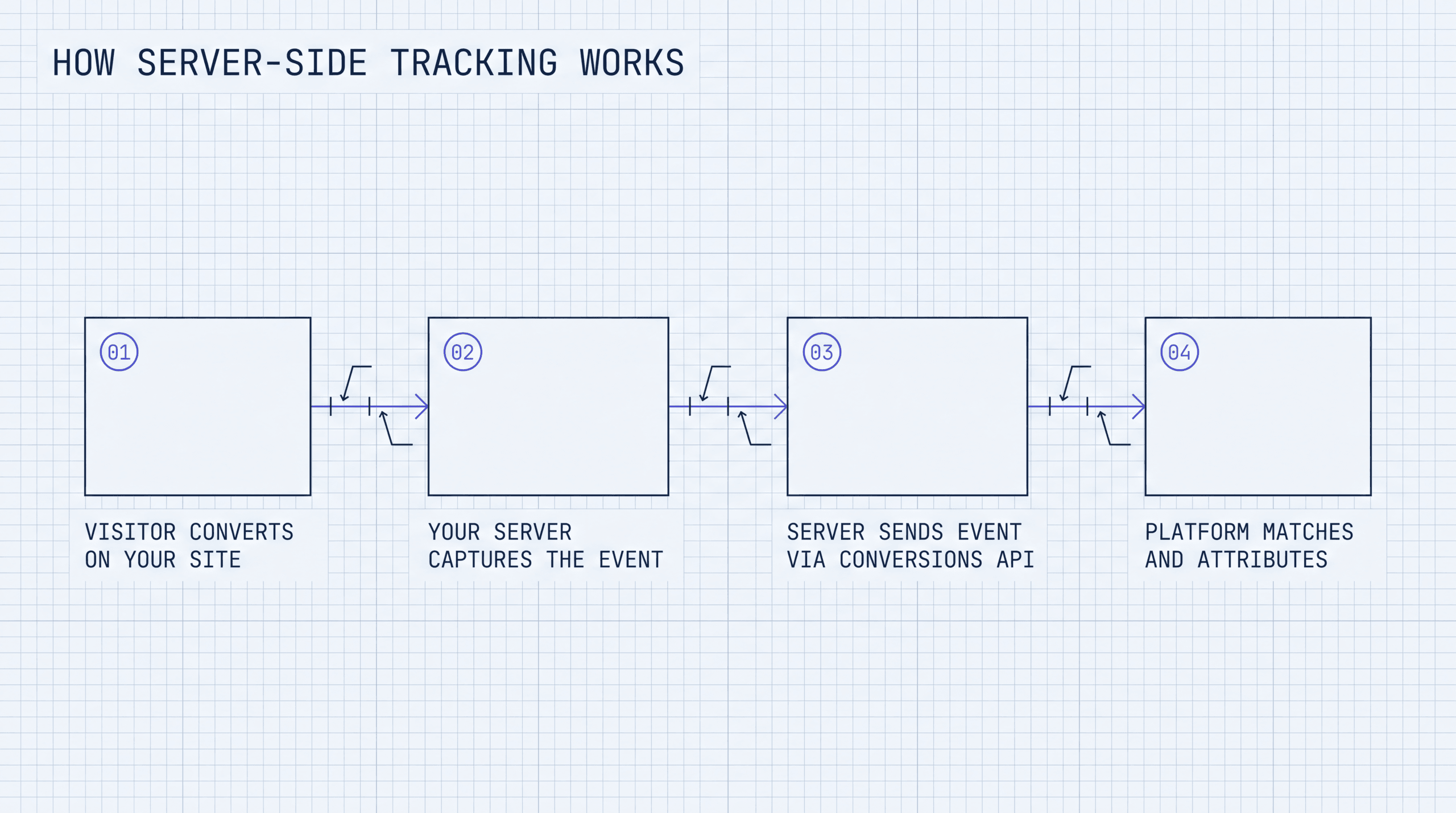
The architecture of server-side tracking follows a five-part flow:
1. User event occurs. A visitor lands on your site, adds a product to cart, or completes a purchase. Your application (Shopify, WordPress, custom app) logs the event.
2. Event data is collected server-side. Instead of (or in addition to) a browser pixel capturing the event, your server records it. This includes the event type, timestamp, order value, and any user identifiers (hashed email, phone number, IP address, user agent string, click ID from the URL).
3. Your server sends the event to the ad platform’s API. Using the platform’s server-side endpoint (Meta CAPI, Google Enhanced Conversions API, TikTok Events API), your server makes an HTTPS POST request with the event payload.
4. The platform matches the event. The ad platform receives the server event and attempts to match it to a user in its system. It uses the hashed identifiers you sent (email, phone, fbclid/gclid click IDs) to tie the conversion back to the ad click that generated it.
5. Deduplication (if running both Pixel and API). If you’re sending the same event from both the browser Pixel and the server API, the platform deduplicates them using a shared event ID. This prevents double-counting.
This architecture means your tracking isn’t dependent on browser behavior. The browser can block scripts, expire cookies, or crash after the purchase page, and the conversion still reaches the ad platform because your server sent it independently.
How to Set Up Server-Side Tracking
Setting up server-side tracking depends on your platform and technical resources. Here is the general process for implementing Meta’s Conversions API, which is the most common starting point.
Step 1: Create a CAPI access token in Meta Events Manager
Go to Meta Events Manager, select your Pixel, and open Settings. Under Conversions API, generate an access token. This token authenticates your server’s API calls. Store it securely. Treat it like a password.
Step 2: Capture click IDs on your landing pages
When a user clicks a Meta ad, the URL includes an fbclid parameter. Your landing page needs to capture this value and store it (in a first-party cookie or your database) so it’s available at conversion time. For Google, capture the gclid. For TikTok, capture the ttclid.
Step 3: Collect user identifiers at the conversion point
When a customer completes a purchase or submits a lead form, collect their email address and/or phone number. Hash these values using SHA-256 before sending them to any ad platform. This is required by Meta, Google, and TikTok for privacy compliance.
Step 4: Build the server-side event payload
Construct a JSON payload matching the platform’s API specification. For Meta CAPI, this includes the event name (Purchase, Lead, AddToCart), event time, user data (hashed email, hashed phone, IP, user agent, fbclid), and custom data (value, currency, content IDs).
Step 5: Send the event via HTTPS POST
Your server sends the payload to the platform’s API endpoint. For Meta, the endpoint is https://graph.facebook.com/v19.0/{pixel_id}/events. Include your access token and the event data. Handle errors and retries. Network failures will happen.
Step 6: Verify event matching and set up deduplication
In Meta Events Manager, check the Event Match Quality score. A score below 6.0 means your user data isn’t matching well and you need to send more identifiers. Set an event_id on both the browser Pixel event and the server event so Meta can deduplicate them correctly.
Code Example: Meta CAPI POST
Here is a working Node.js example that sends a Purchase event to Meta’s Conversions API:
const crypto = require('crypto');

const PIXEL_ID = process.env.META_PIXEL_ID;
const ACCESS_TOKEN = process.env.META_ACCESS_TOKEN;

function hashSHA256(value) {
  return crypto.createHash('sha256').update(value.trim().toLowerCase()).digest('hex');
}

async function sendPurchaseEvent({ email, phone, fbclid, ip, userAgent, value, currency, eventId }) {
  const payload = {
    data: [
      {
        event_name: 'Purchase',
        event_time: Math.floor(Date.now() / 1000),
        event_id: eventId,
        action_source: 'website',
        user_data: {
          em: [hashSHA256(email)],
          ph: phone ? [hashSHA256(phone)] : undefined,
          fbc: fbclid ? `fb.1.${Date.now()}.${fbclid}` : undefined,
          client_ip_address: ip,
          client_user_agent: userAgent,
        },
        custom_data: {
          value: value,
          currency: currency || 'USD',
        },
      },
    ],
  };

  const url = `https://graph.facebook.com/v19.0/${PIXEL_ID}/events?access_token=${ACCESS_TOKEN}`;

  const response = await fetch(url, {
    method: 'POST',
    headers: { 'Content-Type': 'application/json' },
    body: JSON.stringify(payload),
  });

  const result = await response.json();

  if (!response.ok) {
    console.error('CAPI error:', result);
    throw new Error(`CAPI request failed: ${response.status}`);
  }

  return result;
}
This code hashes the email and phone using SHA-256 before transmission. The event_id parameter should match the ID used in your browser Pixel fire so Meta can deduplicate the two events. If you skip deduplication, every conversion gets counted twice.
Common Server-Side Tracking Mistakes
1. Forgetting event deduplication. If you fire both the Meta Pixel and CAPI for the same purchase without matching event IDs, Meta counts it as two conversions. Your reported ROAS doubles overnight. It looks great until you realize your actual revenue did not change. Always set a matching event_id on both the client and server event.
2. Sending unhashed PII. Meta, Google, and TikTok all require that email addresses and phone numbers be SHA-256 hashed before transmission. Sending raw PII violates their terms of service and creates regulatory risk under GDPR and CCPA. Hash before you send. Always.
3. Not capturing click IDs. The fbclid, gclid, and ttclid parameters in your landing page URLs are how platforms match a server event back to the original ad click. If your landing page strips these parameters (some CMS platforms do this by default), your server events arrive without a click ID and the platform can’t attribute them. Check your landing page URLs.
4. Ignoring Event Match Quality. Meta provides an Event Match Quality score in Events Manager. A score below 6.0 means your server events aren’t matching well to Meta users. The fix is usually sending more user identifiers. Add phone number, or make sure the fbclid is being captured correctly.
5. Delayed event transmission. Some implementations batch server events and send them hours later. Meta’s CAPI documentation recommends sending events within one hour of occurrence. Events sent more than 72 hours late are dropped entirely. Send events as close to real-time as possible.
6. Building a custom pipeline without monitoring. Server-side tracking requires infrastructure. Servers go down. APIs change their endpoints. SSL certificates expire. If you build a custom CAPI integration, you need monitoring and alerts. Otherwise, your tracking silently breaks and you don’t notice until your ad performance craters.
Server-Side Tracking and Privacy Law
Server-side tracking doesn’t exempt you from privacy regulations. GDPR, CCPA, and other data protection laws apply to any personal data collection, regardless of whether the collection happens in the browser or on your server.
GDPR (Europe)
Under GDPR, you need a lawful basis (typically consent or legitimate interest) to collect and process personal data. Sending hashed email addresses to Meta via CAPI is still processing personal data. Hashed PII is considered pseudonymous, not anonymous, under GDPR. You need consent for this.
The advantage of server-side tracking under GDPR is control. Because the data flows through your server, you can filter it. If a user declines consent via your cookie banner, you can suppress the server event entirely, or send it without user identifiers so the platform receives an anonymous conversion signal. This is harder to do with client-side pixels, which fire automatically when the page loads.
CCPA (California)
Under CCPA, consumers have the right to opt out of the sale or sharing of their personal information. Sending conversion data with user identifiers to an ad platform can qualify as “sharing” under CCPA’s broad definition. You need to honor opt-out requests and suppress user data transmission for users who have opted out.
Server-side tracking gives you the infrastructure to do this cleanly. Your server checks the user’s consent status before deciding what data to include in the API call. Users who opted out get anonymous events (no email, no phone, no click ID). Users who consented get full-fidelity events.
The Bottom Line on Privacy
Server-side tracking is neither more nor less compliant than client-side tracking by default. The difference is that it gives you more control over what data leaves your infrastructure. That control makes compliance easier to implement correctly, but you still have to implement it.
Build vs Buy: When to Use a Platform Like Hyros
You have two options for server-side tracking: build your own pipeline or use a platform that handles it for you.
Building Your Own
Building your own server-side tracking pipeline means setting up sGTM (server-side Google Tag Manager), writing custom API integrations for Meta CAPI, Google Enhanced Conversions, and TikTok Events API, and maintaining the infrastructure that runs it.
The technical requirements:
– A cloud server or container (Google Cloud Run, AWS Lambda, or a dedicated VPS) to host sGTM or your custom code
– DNS configuration to route a subdomain (e.g., track.yourdomain.com) through your server for first-party context
– Custom code to capture click IDs, hash PII, construct payloads, and handle API errors
– Monitoring and alerting for when endpoints change or servers fail
– Ongoing maintenance as each platform updates their API versions
This approach works for teams with dedicated engineering resources. If you have a developer who can own the integration and keep it running, building in-house gives you full control.
Using a Platform
Platforms like Hyros, Elevar, and Stape handle the server-side infrastructure for you. They provide pre-built integrations with major ad platforms, automatic event deduplication, and dashboards to verify data quality.
Hyros goes beyond basic server-side event forwarding. It builds an independent attribution layer on top of server-side tracking, using deterministic user matching (email, phone) to stitch user journeys across devices and platforms. According to Hyros, their platform tracks 20-50% more sales than ad platforms report on their own, a figure consistent with independent analysis by Softailed showing server-side tracking recovers 18-40% more conversions versus browser-only methods. Most accounts I’ve reviewed are sitting in that 18-40% recovery range, meaning they’re making budget decisions on data that’s missing nearly a quarter of their actual conversions.
The tradeoff is cost versus time. Building your own is cheaper in monthly fees but expensive in engineering hours and ongoing maintenance. A platform costs a monthly subscription but eliminates the development and DevOps overhead.
Decision Framework
Build your own if:
– You have a dedicated developer or DevOps team
– You only need to send events to one or two platforms
– You want full control over the data pipeline
– Your business has low conversion volume (under 500/month)
Use a platform like Hyros if:
– You spend $50,000+ per month on ads and need accurate cross-platform attribution
– You run ads across Meta, Google, TikTok, and other channels simultaneously
– You need independent attribution data that doesn’t rely on platform self-reporting
– You don’t have engineering bandwidth to build and maintain custom integrations
– You need phone call attribution tied back to specific ad clicks
For a comparison of Hyros vs Triple Whale and Hyros vs Northbeam, see our dedicated comparison guides. For a general overview of how ad attribution works across all these tools, read What Is Ad Attribution?.
Hyros ships a server-side tracking layer out of the box, no GTM container to maintain. See how it compares to building your own. Book a demo
FAQ
Is server-side tracking legal under GDPR?
Yes, server-side tracking is legal under GDPR, but it doesn’t exempt you from compliance requirements. You still need a lawful basis (consent or legitimate interest) for collecting and processing personal data. Hashed email addresses and phone numbers are pseudonymous data under GDPR, not anonymous data, so the regulation applies. The advantage of server-side tracking is that you control the data pipeline. You can suppress PII for users who decline consent and send only anonymous conversion signals. This level of control is harder to achieve with browser-based pixels that fire automatically.
Does server-side tracking fix iOS 14.5 tracking issues?
Server-side tracking reduces the data loss caused by iOS 14.5, but it doesn’t eliminate it entirely. ATT affects in-app tracking and cross-app measurement, which server-side tracking can’t fully replace. What server-side tracking does is bypass Safari’s ITP cookie restrictions, recover conversions that the Pixel misses when cookies expire, and send first-party data that helps Meta match conversions it would otherwise lose. Client-side pixels lose 15-40% of conversions on iOS Safari due to ITP. Server-side tracking recovers most of that gap. But users who opted out of ATT still have limited cross-app tracking, and SKAdNetwork attribution for iOS app installs remains aggregated and delayed.
Do I still need the Meta Pixel if I use Conversions API?
Yes. Meta recommends running both the Pixel and CAPI together, not replacing one with the other. The Pixel captures browser-side signals like pageview behavior, scroll depth, and time-on-site. CAPI captures the high-value conversion events (purchases, leads) server-side. Running both with event deduplication (matching event IDs) gives Meta the most complete dataset for optimization. Per Meta’s April 15 2026 announcement, advertisers with a Conversions API setup for web events saw an average 17.8% lower cost per result compared to those without CAPI (Meta for Business).
What is event deduplication and why does it matter?
Event deduplication is the process of preventing the same conversion from being counted twice when you send it from both the browser (Pixel) and the server (CAPI). You achieve this by assigning a unique event_id to each conversion event and including that same ID in both the Pixel fire and the CAPI POST request. When Meta receives two Purchase events with the same event_id, it counts them as one conversion. Without deduplication, every conversion gets double-counted. Your reported ROAS appears twice as high as reality. Your CPA appears half of what it actually is. You make budget decisions based on numbers that are fiction. Always implement deduplication when running Pixel and CAPI simultaneously.
How much does server-side tracking cost?
Cost depends on whether you build or buy. Building your own sGTM setup on Google Cloud typically costs $50-150/month for the server infrastructure, plus the engineering time to build, test, and maintain the integrations. For a custom CAPI implementation without sGTM, costs are similar: server hosting plus development hours. Platform solutions vary. Stape (sGTM hosting) starts around $20/month for low volume. Elevar starts around $200/month for Shopify-focused implementations. Hyros pricing starts at $230/month for paid traffic tracking, scaling up based on ad spend and features. The right comparison isn’t just the monthly cost but the total cost including the developer time you save and the additional revenue from more accurate attribution data. An independent review by CheckThat.ai aggregating 601 Trustpilot reviews found user-reported tracking improvements of 29-33% more conversions versus native platform reporting, gains that typically far exceed the platform cost for businesses spending $50,000+ per month on ads.
Can server-side tracking work with Shopify?
Yes. Shopify supports server-side tracking through multiple paths. You can use Shopify’s built-in webhooks to capture order events and forward them to Meta CAPI or Google Enhanced Conversions via a custom app or middleware. Platforms like Elevar and Hyros offer pre-built Shopify integrations that handle this automatically. For Shopify-specific attribution strategies, see our guide on Shopify attribution.
Standalone Summary
Server-side tracking sends conversion events from your web server directly to ad platforms via API, bypassing the browser-based pixel pipeline that’s now degraded by ad blockers, Safari ITP, and iOS 14.5 App Tracking Transparency. Client-side pixels lose 15-40% of conversions on iOS Safari alone. Server-side tracking recovers most of that lost data by making first-party HTTP requests that aren’t subject to browser restrictions. Meta’s Conversions API, Google’s Enhanced Conversions, and TikTok’s Events API are the three primary server-side endpoints. Per Meta’s April 15 2026 announcement, advertisers with a Conversions API setup for web events saw an average 17.8% lower cost per result compared to advertisers without CAPI. Implementation requires capturing click IDs, hashing user identifiers, constructing API payloads, and managing deduplication between client and server events. Businesses can build custom integrations or use platforms like Hyros, which provides server-side tracking with independent attribution across channels and reports tracking 20-50% more sales than ad platforms alone.
See how Hyros tracks every ad dollar across every channel Book a demo
Related in This Series
Silo: Ad Attribution Fundamentals
More from the Ad Attribution Fundamentals series:
- Ad Tracking vs Analytics: What’s the Difference?
- How iOS 14.5 Changed Ad Attribution Forever
- Attribution for Shopify Stores: What Actually Works
- How Info-Product Businesses Track Ad Revenue
Also explore: