

Attribution for Shopify Stores: What Actually Works
TL;DR
- Shopify attribution means tying every dollar of revenue back to the exact ad, campaign, or channel that produced it. Shopify’s built-in reporting uses last non-direct click, which disagrees with Meta and Google by 20-50% on any given campaign.
- The August 2024 checkout.liquid deprecation broke tracking setups for thousands of Plus merchants who relied on custom scripts in the checkout flow. The replacement (Checkout Extensibility and Web Pixels API) runs pixels in a sandbox that blocks direct DOM access.
- Server-side tracking through a dedicated attribution tool is the only reliable way to get accurate Shopify revenue data across all ad platforms. Hyros reports tracking 20-50% more sales than ad platforms alone across its client base.
- If you’re spending $10K+/month on ads driving traffic to a Shopify store, your default Shopify reports aren’t giving you the data you need to make scaling decisions.
Why Shopify’s Default Reporting Is Not Attribution
Shopify attribution gives you the cleanest order data on earth, but the worst picture of what actually caused those orders. Shopify shows what was bought, not what caused the buy. Here’s what I mean: Facebook’s going to take credit for the sale, Google’s going to take credit for the sale, and you’re not even going to see credit going where it needs to go. Because what’s going to happen is if Google and Facebook are both saying they got the sale and you can’t verify it, it’s a black box. You’re paying twice for the same customer and calling it a win.
I’ve looked at Shopify stores where the Marketing dashboard was the only attribution source the team used. They thought they had three profitable channels. What they actually had was one profitable channel and two platforms stealing credit for the same conversions. Shopify’s own reporting uses last-click via referrer and UTM parameters, which disagrees with what Meta, Google, and TikTok report by 20-50%. Any store spending real money on paid traffic needs a server-side tracking layer on top of Shopify to get numbers they can trust.
There are roughly over 5 million live Shopify stores as of 2024 according to BuiltWith data. Most of those stores rely on Shopify’s Marketing dashboard for attribution data. That dashboard isn’t useless (it has improved since 2023), but it’s consistently wrong by enough to cost you money on scaling decisions.
The Last Non-Direct Click Problem
Shopify’s default attribution model is last non-direct click. Here is what that means in practice: if someone clicks a Meta ad on Monday, browses your store, leaves, then comes back on Thursday by typing your URL directly and buys. Shopify credits Meta. That sounds correct. But if they clicked a Google Ad on Tuesday between those two visits, Shopify still credits Meta because it only looks at the last non-direct click it recorded, not the full journey.
This creates two problems. First, Shopify doesn’t see clicks that happen in-platform (like TikTok or Meta in-app browsers) the same way it sees standard web referrers. Second, Shopify has no mechanism to track the same user across devices. Someone who clicks your ad on their phone and buys on their laptop looks like two different people.
The result: Shopify’s Marketing Reports show a version of reality that can differ from your actual ad performance by 20-50%. That gap gets wider during high-traffic periods like Black Friday, when more customers take multi-device, multi-session paths to purchase.
Platform-Reported vs Deduplicated Revenue
Here is the other side of the problem. Meta, Google, and TikTok each report their own conversion numbers, and each platform claims credit for sales that the other platforms also claim. If you add up the revenue that Meta says it drove, plus Google, plus TikTok, the total will exceed your actual Shopify revenue. Sometimes by 50%. Sometimes by 150%.
According to Databox research, summing all platform-reported conversions typically produces 150-250% of actual closed customers. That isn’t a rounding error. That is the difference between thinking you have three profitable channels and discovering you actually have one and a half.
Shopify’s reports give you a different wrong answer. The platforms give you their own wrong answers. Deduplication (matching every Shopify order to exactly one first-touch source using server-side data) is the only way to get a number you can actually use for budget allocation. For a deeper explanation of how attribution models handle this credit distribution, see What Is Ad Attribution?.
What the Math Actually Looks Like for Shopify Stores
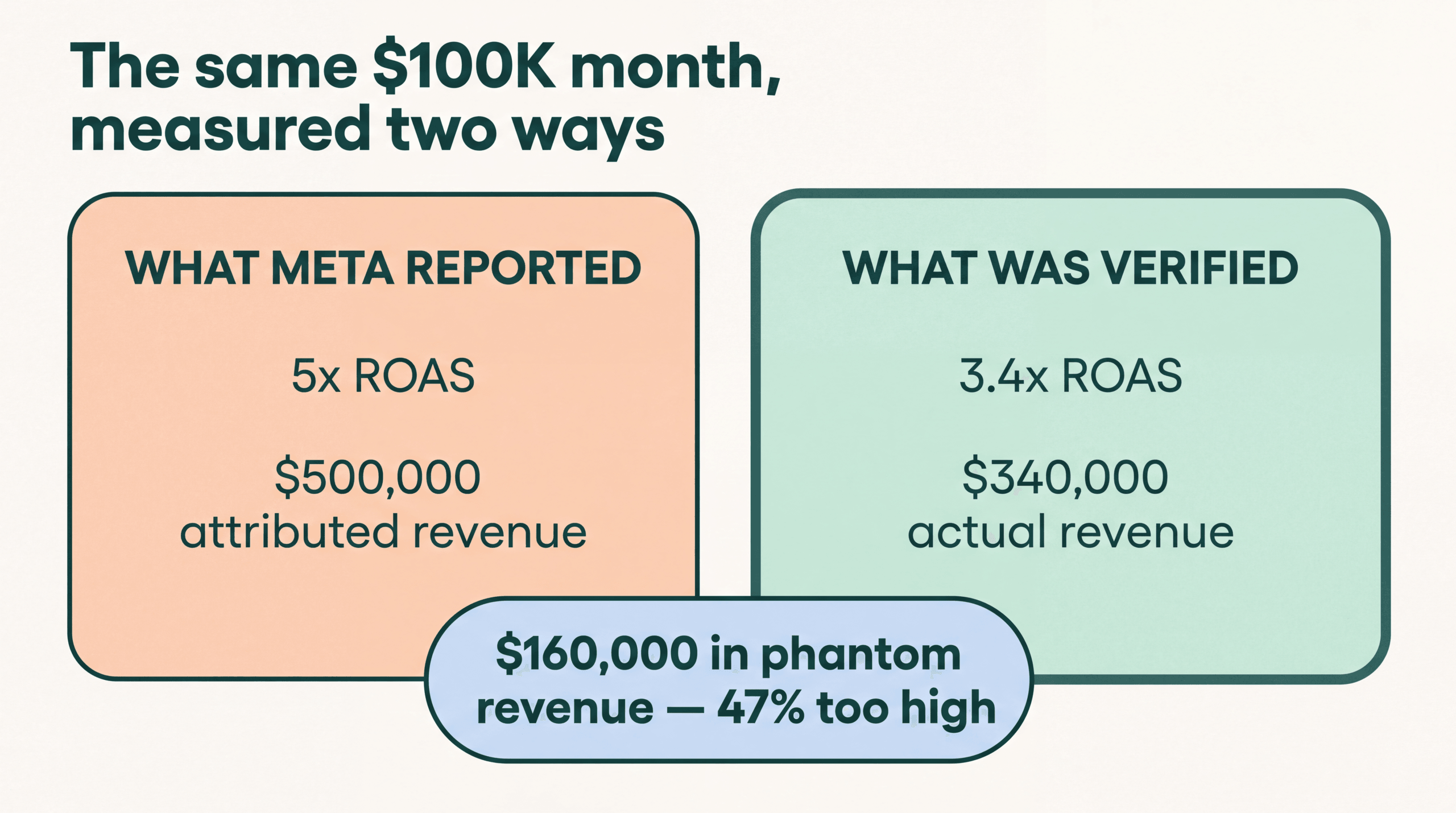
Let’s imagine a DTC Shopify brand spending $100K per month on Meta. Meta’s dashboard reports a 5x ROAS: $500K in attributed revenue. Sounds great. You scale the budget. But when I pull Hyros data on accounts like this, the server-side tracked number comes back at 3.4x ROAS: $340K in actual attributable revenue. That’s $160K in phantom revenue the platform claimed but couldn’t prove. The store was making scaling decisions based on a number that was 47% too high.
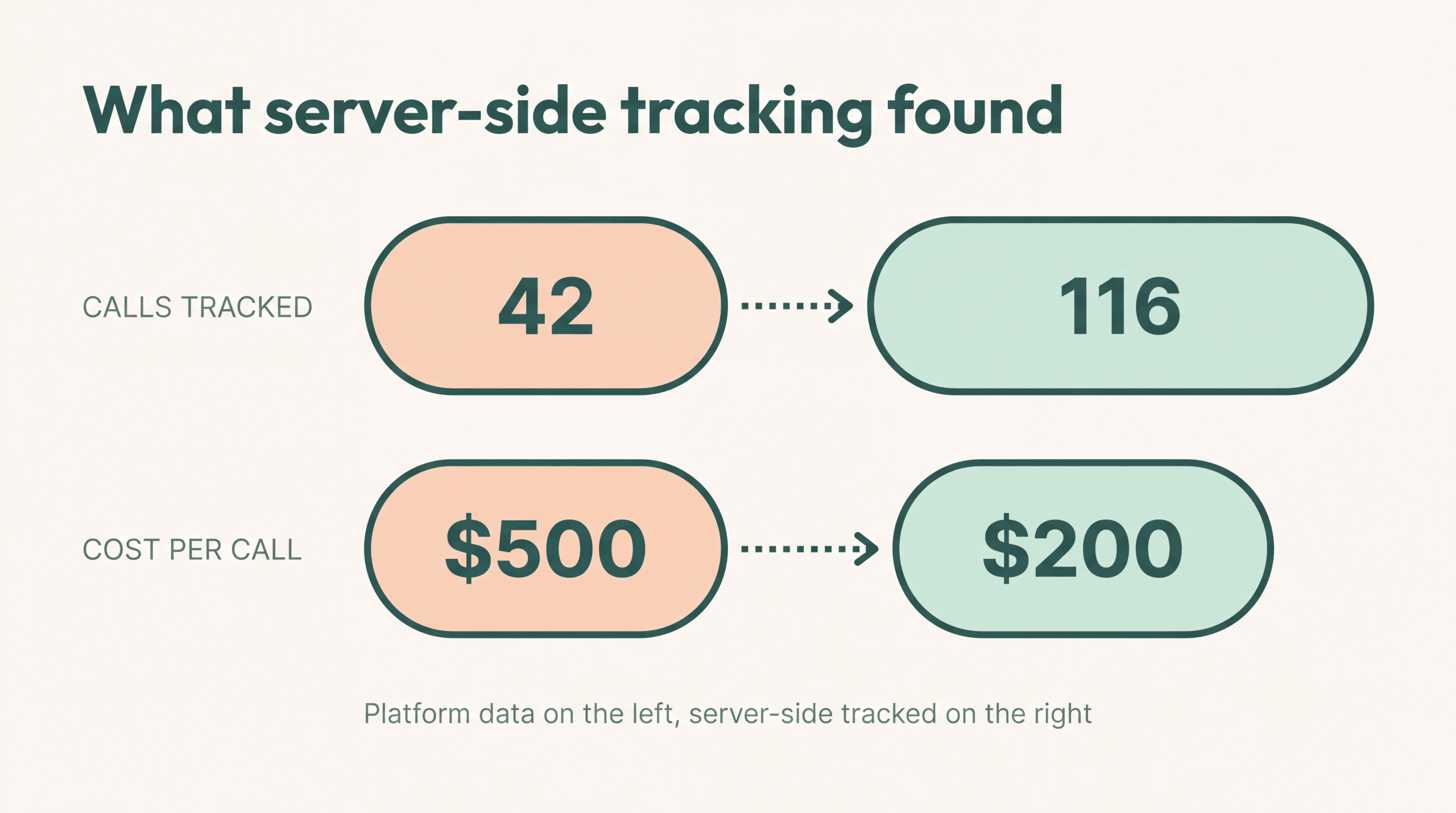
Here’s a real example of what that gap looks like in practice. I’ve looked at accounts where Facebook only caught 42 calls from a campaign. We’re tracking 116 calls in Hyros. Right there, in the same window. If I had been using Facebook’s metrics, I probably would have turned off those ads or at least thought they weren’t that successful. Platform data said the cost per call was $500. Hyros data showed the actual cost was $200 per call. That’s the difference between pausing a winner and scaling a winner, and it happens because the platform pixel misses everything it can’t cookie-match. According to Hyros’s published Shopify integration data, this pattern plays out consistently at scale: Facebook underreports conversions by approximately 30%, Google by 29%, and TikTok by 33% when compared against server-side tracked data. Your Shopify store is almost certainly in the same range.
How Shopify Tracks Conversions in 2026
Shopify’s tracking infrastructure has changed over the past two years. Understanding the current system matters because it determines what data your attribution tools can and can’t access.
Web Pixels API (Sandboxed)
The Web Pixels API is Shopify’s official method for third-party tracking pixels. It runs in one of two sandboxes: Strict (for app-based pixels using web workers) or Lax (for custom pixels added through the admin). Both sandboxes restrict what the pixel code can do.
A sandboxed pixel can subscribe to standard customer events (page_viewed, product_viewed, checkout_started, checkout_completed) and access a limited set of browser APIs. But it can’t access the DOM directly, read arbitrary cookies, or inject scripts into the main page context. This is by design. Shopify wants to control what data third-party pixels can collect.
For attribution tools, the sandbox means you can’t just drop a raw JavaScript snippet onto the checkout page like you could before 2024. Your tracking code has to work within the constraints of the Web Pixels API or use server-side methods that bypass the browser entirely.
Customer Events and Pixel Manager
Shopify’s Pixel Manager is the admin interface where store owners install and manage pixels. Customer Events are the standardized event types that Shopify publishes to all installed pixels. The key events for attribution are:
- checkout_started: fires when a customer begins checkout
- checkout_completed: fires when a purchase is confirmed
- product_added_to_cart: fires on add-to-cart
- page_viewed: fires on every page load
These events pass data like product IDs, cart value, and (in some cases) customer email. But the data is filtered through the sandbox. You get what Shopify decides to expose, not raw access to the page.
Checkout Extensibility for Plus Merchants
Shopify Plus merchants have access to Checkout Extensibility, which replaced checkout.liquid for customizing the checkout flow. Checkout Extensibility uses checkout UI extensions (built with Shopify’s React-based framework) and Shopify Functions for backend logic.
For tracking purposes, Checkout Extensibility provides the same Web Pixels API access as standard Shopify, with additional capabilities like post-purchase page extensions and order status page customization. Plus merchants can also build custom apps with access to the Checkout API for server-side event capture.
Server-Side Tracking via Custom Apps
The most reliable tracking path on Shopify is server-side. Custom apps or dedicated attribution platforms can subscribe to Shopify webhooks (orders/create, orders/paid, checkouts/create) to capture conversion data directly from Shopify’s backend. This data never touches the browser, so it isn’t affected by ad blockers, cookie restrictions, or sandbox limitations.
Server-side tracking is how Hyros and similar platforms get their data. When someone buys on your Shopify store, the order webhook fires with the full order details: customer email, phone number, order value, and product IDs. The attribution platform matches that data against its own record of ad clicks and user sessions to determine which ad actually drove the sale.
For a full explanation of why server-side tracking matters, see Server-Side Tracking Explained.
The August 2024 checkout.liquid Deprecation
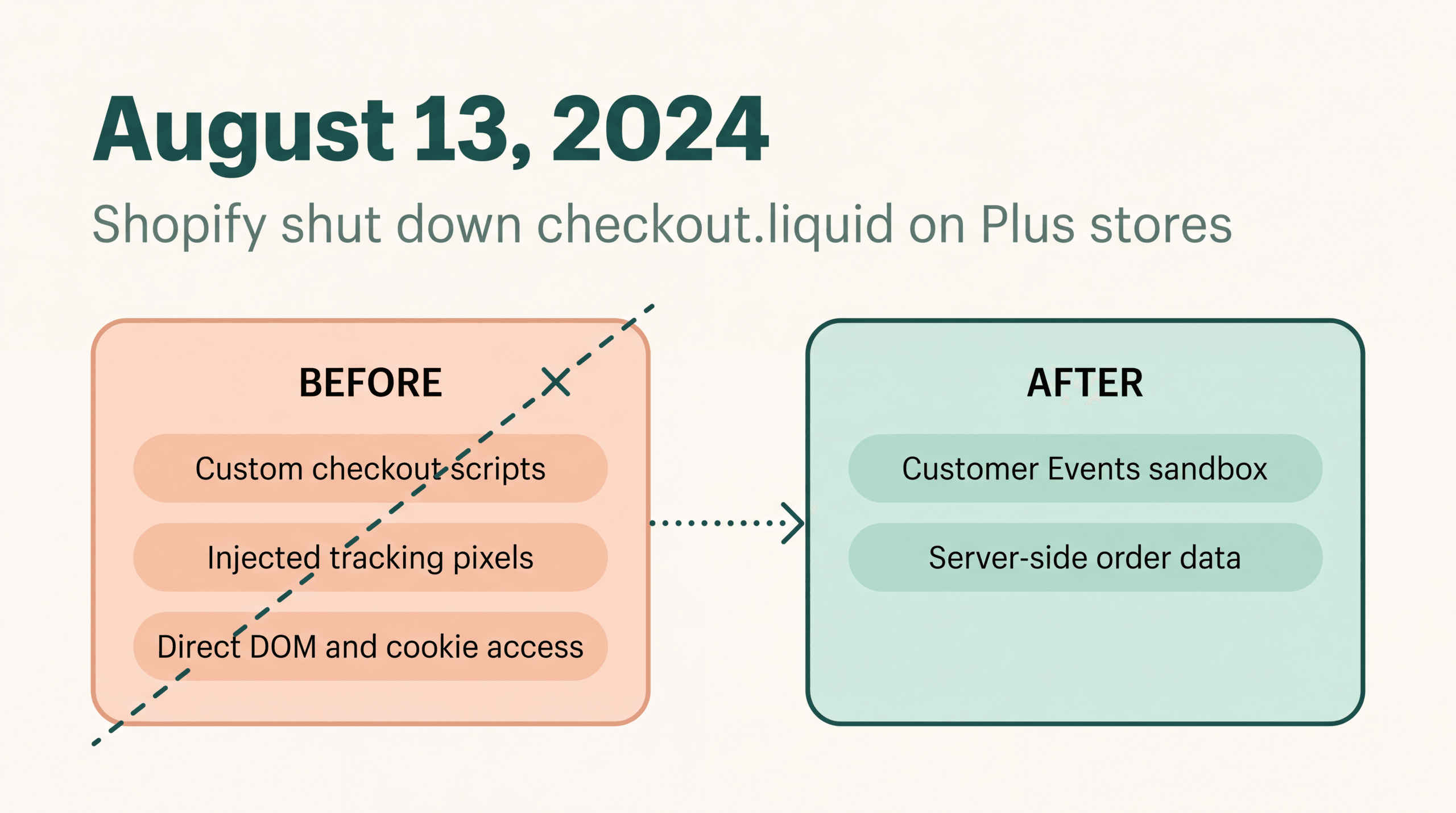
On August 13, 2024, Shopify officially shut down checkout.liquid for in-checkout pages on Plus stores. This wasn’t a surprise. Shopify had announced the deprecation months in advance, but many merchants were not ready.
checkout.liquid was the template file that Plus merchants used to customize their checkout pages. For tracking purposes, it was critical because merchants and their agencies could inject custom JavaScript directly into the checkout flow. That meant raw access to the DOM, the ability to read and write cookies, and the freedom to fire any tracking pixel at any point during checkout.
When checkout.liquid stopped working, every custom tracking script that relied on it broke. Merchants who had Facebook Pixels, Google Tags, TikTok Pixels, or third-party attribution scripts injected via checkout.liquid lost their checkout tracking overnight if they had not migrated.
The impact was worse than it needed to be because some tracking setups were deeply embedded. Agencies had built multi-layer tracking systems over years using checkout.liquid, firing conversion events at different checkout steps, passing custom parameters, reading hidden form fields. All of that had to be rebuilt using the Web Pixels API or moved server-side.
Starting January 6, 2025, Shopify began auto-upgrading remaining checkout.liquid stores with 30 days notice. And as of August 28, 2025, checkout.liquid for thank-you and order status pages was also fully shut down.
The lesson: any Shopify attribution setup that depends on client-side JavaScript in the checkout is fragile. Shopify will continue tightening what third-party code can do in the checkout flow. Server-side tracking is the only approach that isn’t subject to platform-side restrictions. I watched this play out across dozens of Hyros accounts in August 2024. Stores that had pixel-based checkout tracking went dark overnight. The ones with server-side webhook setups didn’t miss a conversion.
How to Set Up Shopify Attribution That Actually Works
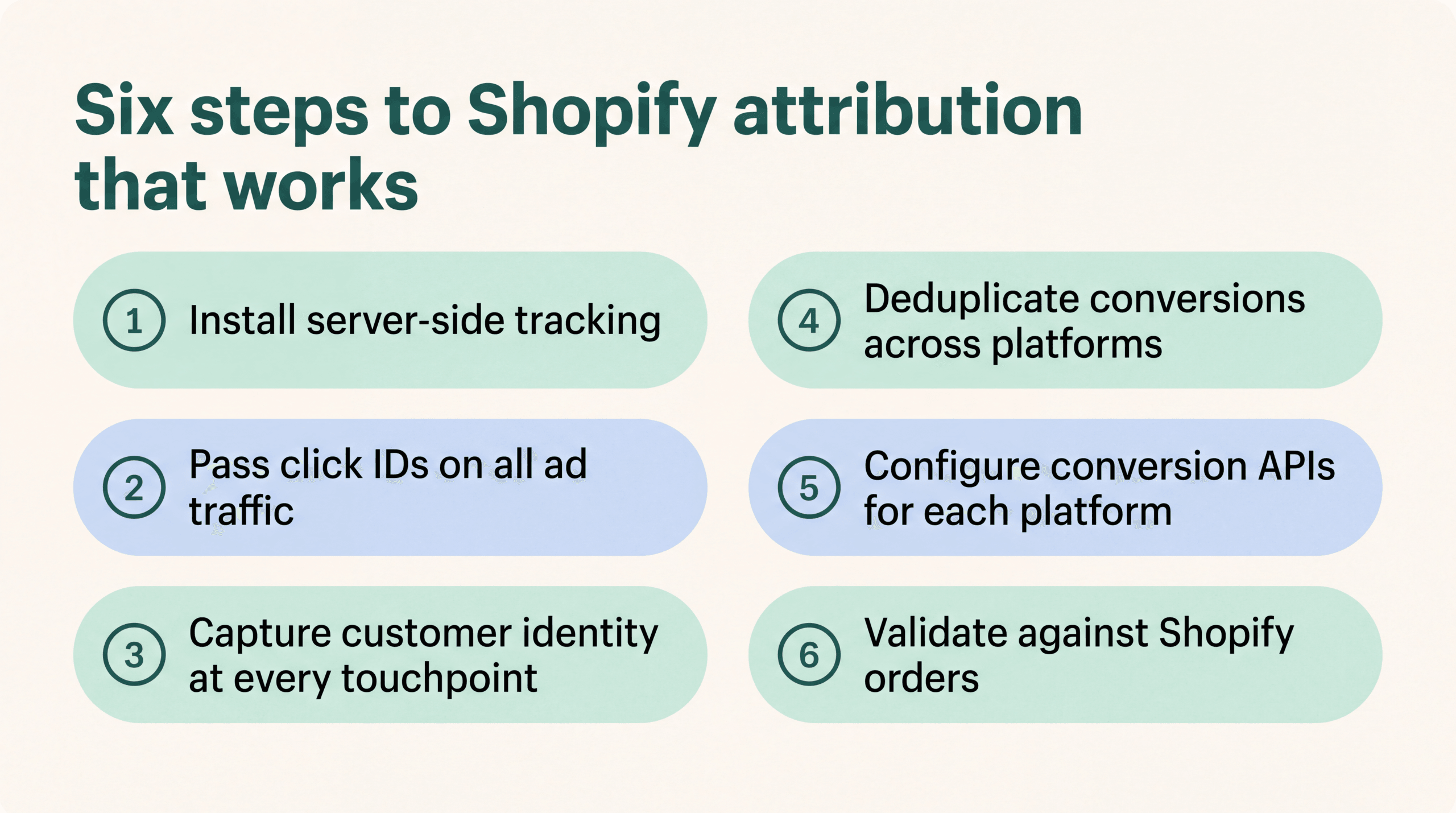
Getting accurate attribution on Shopify requires six steps. Skip any of them and your data will have gaps.
Step 1: Install Server-Side Tracking
Install an attribution platform that captures Shopify order data via webhooks or API, not just browser-side pixels. This gives you a conversion record that’s independent of what the customer’s browser does. Server-side tracking isn’t affected by ad blockers, cookie settings, or Shopify’s pixel sandbox.
Hyros, for example, connects to Shopify via the Pixel Manager and also receives order data server-side. This dual approach means you get both the browser-side click data (which ad the customer came from) and the server-side conversion data (what they actually bought).
Step 2: Pass Click IDs on All Ad Traffic
Every ad platform generates a click identifier when someone clicks your ad. Facebook uses fbclid. Google uses gclid. TikTok uses ttclid. These parameters appear in the URL when a user lands on your Shopify store.
Your attribution system needs to capture and store these click IDs. If your landing page URLs strip the query parameters (some Shopify themes do this), or if your redirects drop them, you lose the connection between the ad click and the eventual purchase. Check every landing page URL to confirm click IDs survive the redirect chain.
Step 3: Capture Customer Identity at Every Touchpoint
The most reliable way to match a click to a conversion is through deterministic identity: email address, phone number, or customer account. Make sure your opt-in forms, add-to-cart flows, and checkout all capture customer email as early as possible.
The earlier you capture an email, the more of the customer journey you can attribute. A customer who enters their email on a lead magnet page and then buys three weeks later can be tracked across that entire window. A customer who only provides their email at checkout gives you a single-session view.
Step 4: Deduplicate Conversions Across Platforms
Once you have server-side order data and click IDs, deduplicate. For each Shopify order, determine the single true source. If Meta and Google both claim the same sale, your attribution system needs to resolve the conflict using the actual click data, not just accept both claims.
This is where order_id matching matters. Send your Shopify order IDs to each ad platform’s conversion API (Meta CAPI, Google Ads offline conversions) so the platforms can match against your deduplicated data. Without order_id deduplication, you will double-count revenue and overestimate ROAS on every channel. To understand how these ROAS calculations work, see How to Calculate ROAS.
Step 5: Configure Conversion APIs for Each Platform
Set up Meta Conversions API (CAPI), Google Ads Enhanced Conversions, and TikTok Events API alongside your attribution platform. These server-side connections send your verified conversion data back to the ad platforms, which improves their optimization algorithms.
The key here: send deduplicated data, not raw pixel fires. If you send both pixel data and CAPI data without deduplication, the platforms will double-count your conversions, which inflates their reported performance and distorts their bidding algorithms.
Step 6: Validate Against Shopify Orders
After setup, run a validation check. Pull your Shopify orders for the last 7 days. Compare them against what your attribution platform tracked and what each ad platform reported. The numbers should line up like this:
- Your attribution platform’s total revenue should match Shopify’s total revenue within 2-5%
- Each ad platform’s reported revenue will be higher than what your attribution platform assigns to that platform (because platforms over-claim)
- The sum of all platform-reported revenue will exceed your Shopify total (because of cross-platform double-counting)
If your attribution platform shows more or fewer orders than Shopify, you have a tracking gap. Fix it before making any budget decisions based on the data.
Shopify Attribution Tools Compared
Five tools handle Shopify attribution differently. Here is how they compare on the features that matter for accurate revenue tracking.
| Feature | Shopify Marketing Reports | Triple Whale | Northbeam | Polar Analytics | Hyros |
|---|---|---|---|---|---|
| Attribution Model | Last non-direct click | Multi-touch (proprietary) | Multi-touch (data-driven) | Multi-touch, MMM | Multi-touch, data-driven |
| Server-Side Tracking | No | Yes (Pixel) | Yes | Yes | Yes |
| Cross-Device Matching | No | Limited | Yes | Limited | Yes (deterministic) |
| Checkout Tracking | Native | Web Pixels API | Web Pixels API | Web Pixels API | Web Pixels API + server-side |
| CAPI Integration | Basic | Meta, Google | Meta, Google, TikTok | Meta, Google | Meta, Google, TikTok |
| Order Deduplication | No | Yes | Yes | Yes | Yes |
| Best For | Basic reporting | DTC brands, Shopify-native | Enterprise, multi-channel | Analytics-first teams | High-spend advertisers ($50K+/mo) |
Shopify’s built-in marketing reports are free and give you a starting point, but they lack server-side tracking, cross-device matching, and deduplication. For stores spending under $5K/month on ads, they may be sufficient. Above that threshold, the inaccuracies start costing real money.
For detailed head-to-head analysis, see Hyros vs Triple Whale and Hyros vs Northbeam.
According to data published on the Hyros Shopify integration page, Facebook underreports conversions by approximately 30%, Google by 29%, and TikTok by 33% when compared against Hyros server-side tracked data. An independent analysis by CheckThat.ai (which aggregated 601 Trustpilot reviews) found user-reported tracking gaps of 29-33% consistent with those figures.
Real-world results back this up. Dan Henry (closedeals.com) became 300% more profitable and scaled from $20K to $300K per month in ad spend after switching to accurate attribution. Legion Athletics saw 25% year-over-year Black Friday revenue growth. Liz Carter scaled from $1K to $8K per day in spending. These are Shopify merchants who moved from platform-reported data to independent, server-side attribution.
Common Shopify Attribution Mistakes
In the accounts I’ve reviewed, this mistake (using the Marketing dashboard as ground truth) is the one that costs stores the most. In one case, a store spending $80K a month on ads was making scaling decisions based on last non-direct click data that disagreed with their actual Shopify orders by nearly 40%. They thought Meta was carrying the account. Server-side data showed Google was doing the real work. Six mistakes show up repeatedly in setups like that. Each one creates data gaps that lead to bad spending decisions.
Trusting the Marketing Dashboard as Ground Truth
Shopify’s Marketing dashboard is a reporting tool, not an attribution system. It doesn’t track users across devices, doesn’t deduplicate cross-platform conversions, and uses a simple last non-direct click model. Treating it as ground truth means you’re making budget decisions on incomplete data.
The dashboard is useful for a directional view: it tells you roughly which channels are driving traffic. But “roughly” isn’t good enough when you’re deciding whether to scale a campaign from $10K to $50K per month.
Running Pixel and CAPI Without Deduplication
If you send both browser-side pixel data and server-side CAPI data to Meta or Google without deduplication, the platform sees two conversion events for every sale. This inflates your reported ROAS, which makes the platform’s bidding algorithm more aggressive than it should be. You end up paying more per conversion because the platform thinks it’s performing better than it actually is.
Fix: use event_id matching between pixel and CAPI events. Meta’s documentation calls this deduplication, and it requires a shared event_id parameter sent with both the pixel fire and the CAPI call.
Forgetting fbclid, gclid, and ttclid Preservation
Click ID parameters are how attribution platforms connect an ad click to a conversion. If your Shopify theme, redirect rules, or URL shorteners strip these parameters from the URL, you lose the connection entirely. The ad click happened, but your attribution system can’t match it to the order.
Check your full redirect chain. Load a landing page URL with ?fbclid=test123 appended and verify the parameter survives through every redirect until the final page loads. Do the same for gclid and ttclid.
Missing order_id in Conversion Events
When you send conversion data back to ad platforms via their APIs, include the Shopify order_id. This allows both you and the platform to match specific orders and identify duplicates. Without order_id, there’s no reliable way to reconcile your server-side data with what the platform reports.
Not Validating Against Payment Processor
Your attribution platform’s tracked revenue should match what your payment processor (Stripe, PayPal, Shopify Payments) actually collected. If there’s a gap larger than 5%, something is broken in your tracking. Common causes: orders that were placed but not paid, refunds not synced, or subscription renewals counted as new orders.
Ignoring Post-Purchase Attribution Windows
A customer who buys today might return and buy again in 30 days. If your attribution window is set to 7 days (Meta’s default post-iOS 14.5), that second purchase gets no attribution. You think the campaign stopped working when it actually produced a repeat buyer. Set your attribution windows based on your actual purchase cycle, not platform defaults.
FAQ
Does Shopify have built-in attribution?
Shopify has built-in reporting that includes basic attribution. The Marketing section of your Shopify admin shows which channels drove sessions and orders using a last non-direct click model. This isn’t a full attribution system. It doesn’t track users across devices, doesn’t deduplicate cross-platform conversions, and can’t tell you the true ROAS of individual campaigns. For stores spending less than $5K/month on ads, it provides a reasonable approximation. Above that spend level, the inaccuracies cost you more than a proper attribution tool would.
Why does Shopify show different revenue than Meta or Google?
Shopify, Meta, and Google each use different attribution models, different tracking methods, and different attribution windows. Shopify uses last non-direct click with referrer/UTM data. Meta uses its own pixel and CAPI data with a 7-day click, 1-day view window. Google uses its own click data. Each system sees a partial view of the customer journey and fills in the gaps with its own assumptions. The result is three different revenue numbers for the same set of orders. For the most accurate picture, you need an independent attribution platform that deduplicates across all three, like the tools covered in Best Attribution Tools.
What is the Web Pixels API?
The Web Pixels API is Shopify’s official framework for running third-party tracking pixels on Shopify stores. It replaces the old method of injecting raw JavaScript into theme files or checkout.liquid. The API runs pixels in a sandbox (Strict for app-based pixels, Lax for custom pixels) that limits what the code can access. Pixels can subscribe to standard customer events like page views, add-to-cart, and checkout completion, but can’t access the DOM directly or read arbitrary browser data. This protects customer privacy but limits what browser-side tracking can capture.
Do I need Shopify Plus for server-side attribution?
No. Server-side attribution works on any Shopify plan because it uses Shopify’s standard webhook and API infrastructure, which is available to all merchants. Attribution platforms like Hyros receive order data via Shopify webhooks (orders/create, orders/paid) regardless of your Shopify plan. What Shopify Plus gives you is Checkout Extensibility: more control over the checkout UI and additional checkout-level APIs. But for attribution purposes, the critical data flows through webhooks that are available on Basic, Shopify, Advanced, and Plus plans.
What is the best attribution tool for a Shopify store doing $2M per year?
At $2M/year in revenue, you’re likely spending $200K-$500K/year on ads. At that scale, a 20% improvement in attribution accuracy translates to $40K-$100K in better-allocated ad spend. Hyros, Triple Whale, and Northbeam all serve stores at this level. Hyros is strongest for stores running multi-platform ad campaigns (Meta + Google + TikTok) with high average order values, because its deterministic matching and server-side tracking capture the full cross-platform journey. Triple Whale is popular with Shopify-native DTC brands that want an all-in-one dashboard. Northbeam is strong for enterprise brands running complex multi-channel campaigns. The right choice depends on your ad mix, your team’s technical capacity, and whether you need phone or call tracking in addition to web attribution.
Standalone Summary
Shopify attribution is the process of tying revenue from Shopify orders back to the specific ads, campaigns, and channels that produced each sale. Shopify’s default Marketing Reports use a last non-direct click model that disagrees with Meta, Google, and TikTok by 20-50% on campaign-level revenue. The August 2024 deprecation of checkout.liquid forced all Plus merchants onto Checkout Extensibility and the Web Pixels API, which runs third-party pixels in a sandbox that blocks direct DOM access. Accurate Shopify attribution in 2026 requires server-side tracking via webhooks or API, click ID preservation (fbclid, gclid, ttclid), deterministic user matching through email and phone, and cross-platform deduplication using order_id. Attribution platforms like Hyros, Triple Whale, and Northbeam provide this layer on top of Shopify. Hyros reports tracking 20-50% more sales than ad platforms alone, with Facebook underreporting by approximately 30%, Google by 29%, and TikTok by 33% versus server-side data.
Hyros connects to any Shopify store via Pixel Manager in under 10 minutes. Stop trusting platform-reported ROAS → Book a demo
Related in This Series
Silo: Ad Attribution Fundamentals
More from the Ad Attribution Fundamentals series:
- How iOS 14.5 Changed Ad Attribution Forever
- How Info-Product Businesses Track Ad Revenue
- Ad Tracking vs Analytics: What’s the Difference?
- Server-Side Tracking: The Complete Guide
Also explore: